BugWalk
Created an App for Bug Bounty Assistance.
Introduction
Bug bounty hunting has a rhythm to it. You spin up your scans, kick off a few tools, and settle in to sift through whatever comes back. Maybe it’s late. Maybe you’ve got twenty-five tabs open (in this browser instance, anyway). Maybe you’re convinced there’s something there if you just look at it long enough. The same kind of certainty that if you open the refrigerator enough times, something new will appear. Scroll. Skim. Question your own sanity (and everyone else’s). Take a few notes. Develop half-formed ideas that might lead somewhere or might not. At some point, you stop and ask yourself the same question every time: what do I actually do with all of this?
The Problem
That is when it starts to become clear what the work actually is. The problem is not that hunters lack tools. It is that the tools do not talk to each other in any meaningful way. You get your Nmap results over here, your Nuclei findings over there, and your manual notes living somewhere else entirely (hello, CherryTree, my old friend). None of it carries forward into the next decision. So every time you come back to a target, you are not continuing the work. You are reconstructing it. Context lives in your head, and nowhere else. The signal gets buried, intuition fades, and even a short break is enough for everything to degrade just enough that you are starting over again. BugWalk came out of that realization. Treating each piece of data as part of a growing intelligence picture, instead of a disconnected artifact. Something that carries context forward, refines it over time, and turns it into a playbook you can actually act on.
The Stack
- Storage
- SQLite - Server-side persistence
- LLM Model - Playbook generation and artifact review
- Backend
- SQLAlchemy - Persistence through ORM and modeling
- FastAPI - Framework for API infrastructure
- Frontend
- React - UI component library
- Vite - Development server and build tool
My Role
I followed the same approach as my last project. I architected the entire application and handled all engineering decisions. That meant designing the context window management strategy, deciding what gets persisted and how it feeds back into prompts, and mapping the ingestion pipeline for different scan formats. Claude AI generated the code from the architecture I defined. I drove generation through precise prompt engineering, one feature at a time, and reviewed everything as a repository maintainer before it landed.
Current Status
MVP: In Progress. The engine runs. The playbooks generate. The real test is whether it finds something worth reporting.
The Process
Walkthrough
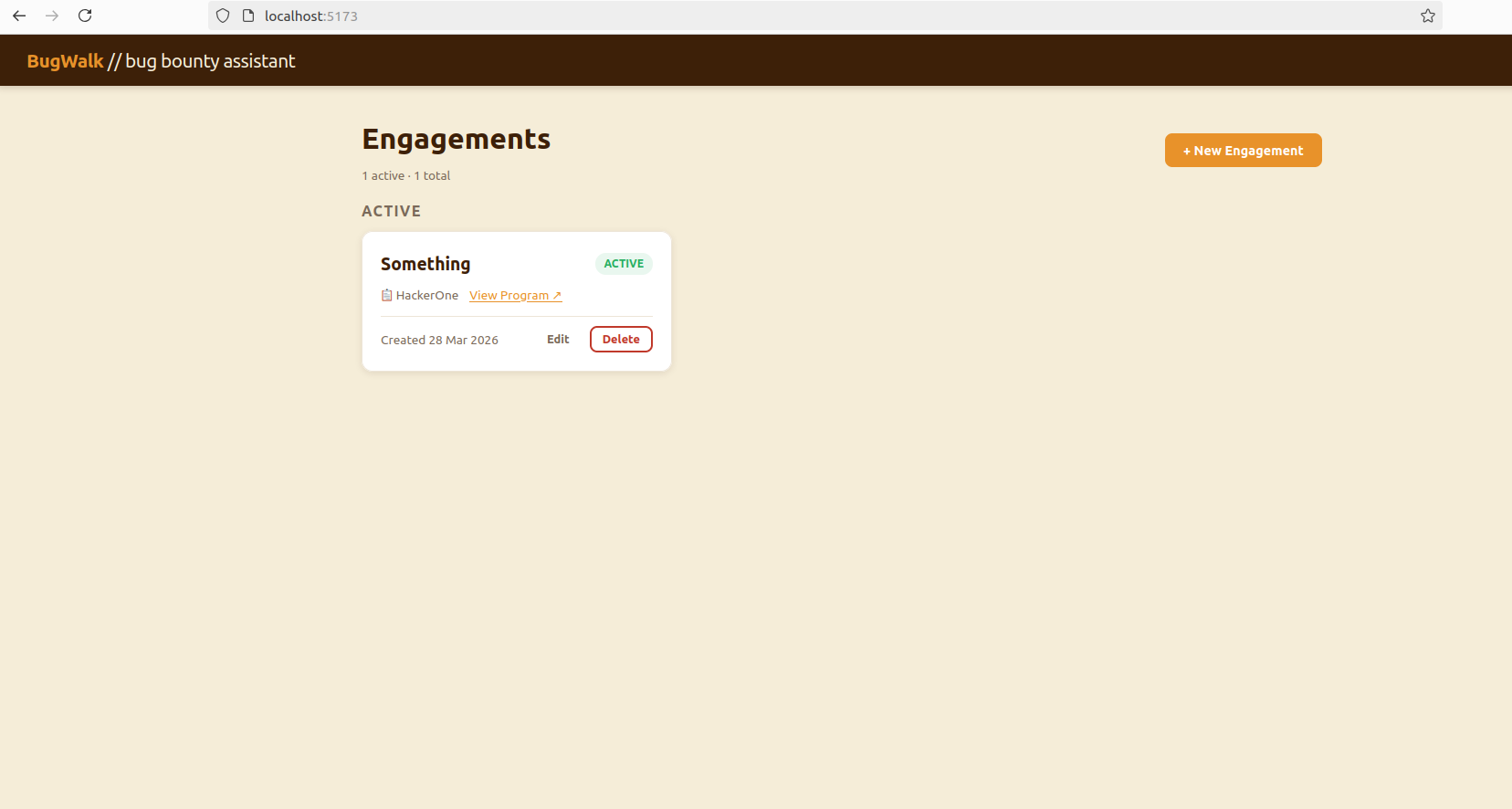
The Landing Page
The landing page gives you a view of your active targets. It is the first thing you see, and ideally the last place you have to go before you know what to do next.
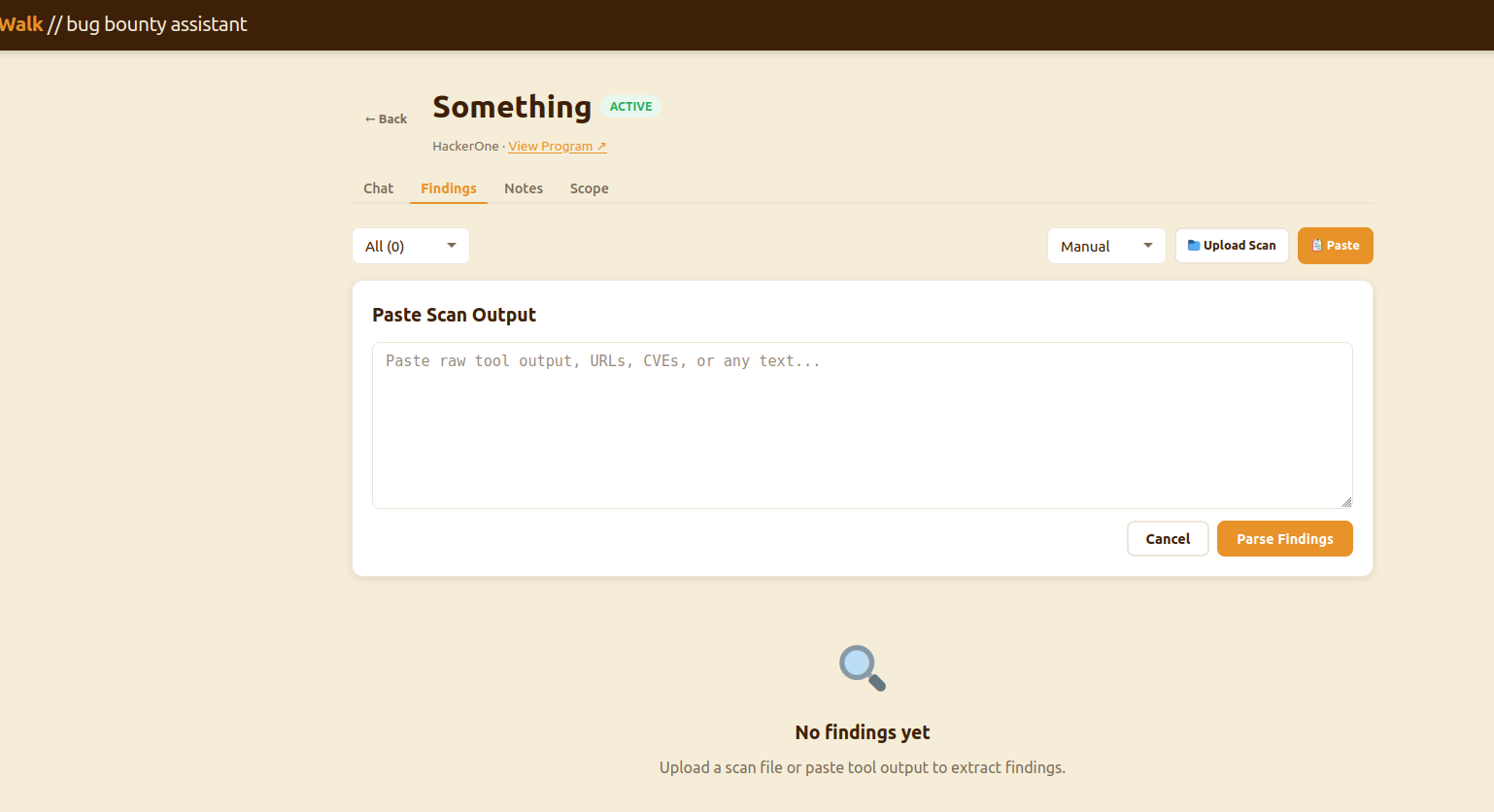
Scan Ingestion
The investigation screen is where you can incorporate your context. You upload Nmap results, Nuclei output, or manual notes and the parser breaks them down and adds them to the target’s history. It gets folded into the prompt on every subsequent request, so the model always knows what has already been seen on this target and what has not.
Playbook Generation
With scans loaded, you generate a playbook. The model has the full picture, every scan, finding, note, and produces a prioritized set of next steps grounded in what is actually in front of you. Not a generic checklist. Not a methodology template. A decision, made from your data.
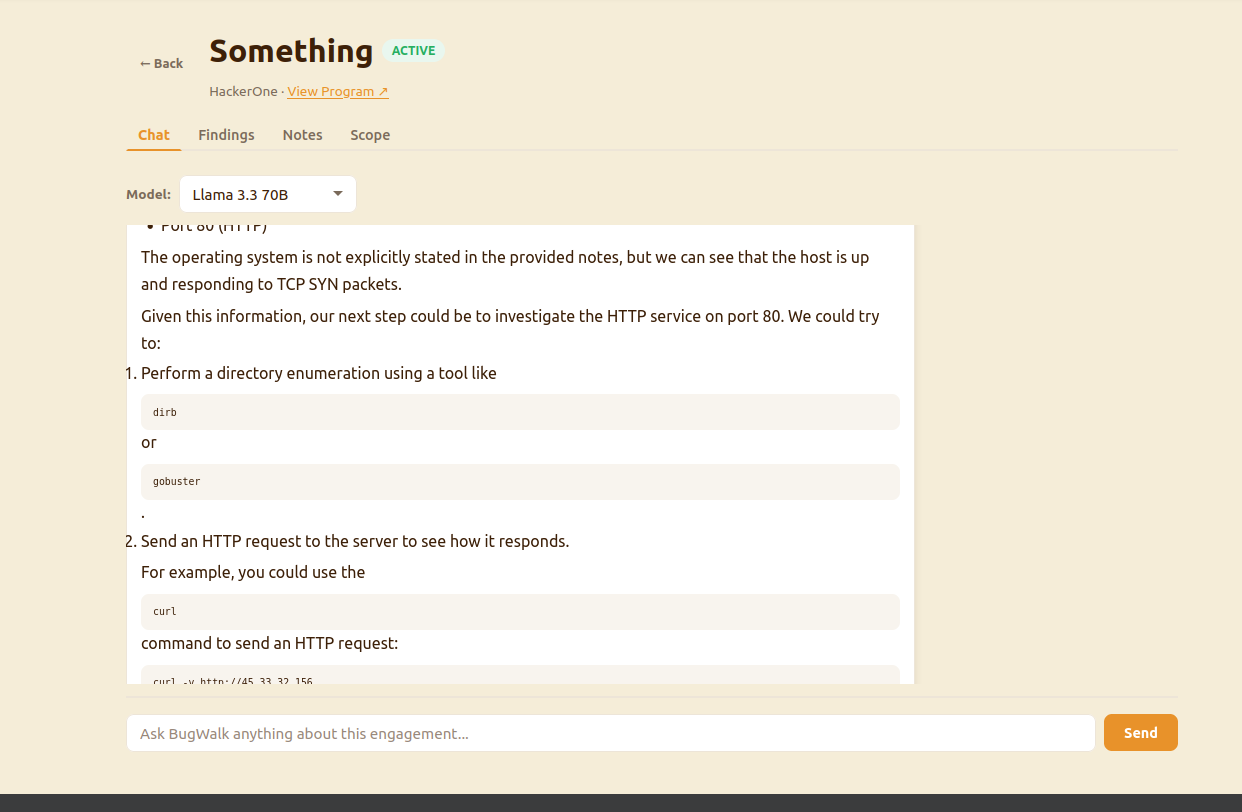
Playbook Tracking
Everything that was suggested in the playbook also gets tracked. This also gets folded into the prompt. This will stop that irritating circle AIs sometimes run into where it keeps suggesting the same thing over and over.
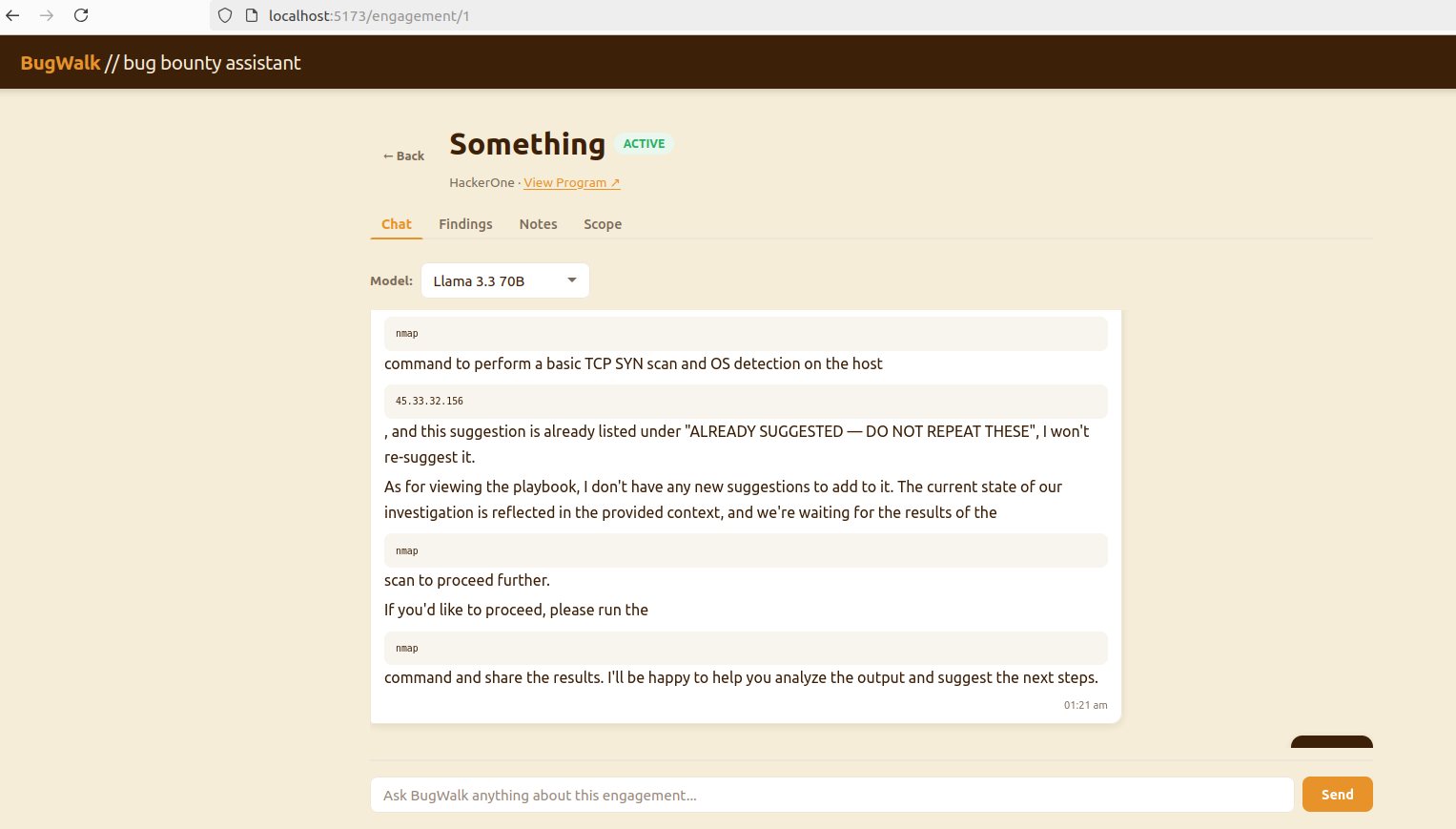
The Code
Backend
The database layer establishes the connection and session lifecycle used across the application.
from sqlalchemy import create_engine
from sqlalchemy.orm import sessionmaker, DeclarativeBase

DATABASE_URL = "sqlite:///./bugwalk.db"

engine = create_engine(
    DATABASE_URL,
    connect_args={"check_same_thread": False}
)

SessionLocal = sessionmaker(autocommit=False, autoflush=False, bind=engine)

class Base(DeclarativeBase):
    pass

def get_db():
    db = SessionLocal()
    try:
        yield db
    finally:
        db.close()
SQLAlchemy models define how engagement state is persisted. This includes both user input and system-generated artifacts.
from sqlalchemy import Column, Integer, String, DateTime, Text, ForeignKey
from sqlalchemy.orm import relationship
from sqlalchemy.sql import func
from app.core.database import Base

class ChatMessage(Base):
    __tablename__ = "chat_messages"

    id            = Column(Integer, primary_key=True, index=True)
    engagement_id = Column(Integer, ForeignKey("engagements.id"), nullable=False)
    role          = Column(String, nullable=False)   # "user" | "assistant"
    content       = Column(Text, nullable=False)
    created_at    = Column(DateTime(timezone=True), server_default=func.now())

    engagement    = relationship("Engagement", back_populates="chat_messages")


class SessionBlock(Base):
    __tablename__ = "session_blocks"

    id              = Column(Integer, primary_key=True, index=True)
    engagement_id   = Column(Integer, ForeignKey("engagements.id"), nullable=False)
    suggestion_hash = Column(String, nullable=False)  # fingerprint of the suggestion
    suggestion_text = Column(Text, nullable=False)    # human readable version
    created_at      = Column(DateTime(timezone=True), server_default=func.now())

    engagement      = relationship("Engagement", back_populates="session_blocks")
The API layer exposes the system through FastAPI routes. These endpoints handle request validation, model selection, and route execution into the decision engine.
from fastapi import APIRouter, Depends, HTTPException
from sqlalchemy.orm import Session
from typing import List, Optional
from pydantic import BaseModel
from app.core.database import get_db
from app.models.engagement import Engagement
from app.models.chat import ChatMessage
from app.services.groq_service import chat, AVAILABLE_MODELS, DEFAULT_MODEL

router = APIRouter()

class ChatRequest(BaseModel):
    message:   str
    model_key: Optional[str] = DEFAULT_MODEL

class ChatMessageResponse(BaseModel):
    id:            int
    role:          str
    content:       str
    created_at:    str

    model_config = {"from_attributes": True}

@router.post("/{engagement_id}/chat")
def send_message(
    engagement_id: int,
    payload: ChatRequest,
    db: Session = Depends(get_db)
):
    engagement = db.query(Engagement).filter(
        Engagement.id == engagement_id
    ).first()
    if not engagement:
        raise HTTPException(status_code=404, detail="Engagement not found")

    if payload.model_key not in AVAILABLE_MODELS:
        raise HTTPException(
            status_code=400,
            detail=f"Unknown model. Available: {list(AVAILABLE_MODELS.keys())}"
        )

    result = chat(
        db=db,
        engagement_id=engagement_id,
        engagement_name=engagement.name,
        user_message=payload.message,
        model_key=payload.model_key,
    )
    return result

    <snip>
The services layer is where BugWalk’s core logic lives. This is where engagement context is assembled, prompts are constructed, and model interactions are managed. Findings, notes, scope, and prior playbooks are merged into a single prompt that drives decision generation.
import os
import hashlib
from groq import Groq
from dotenv import load_dotenv
from typing import List, Dict, Optional
from sqlalchemy.orm import Session
from app.models.chat import ChatMessage, SessionBlock
from app.models.finding import Finding, FindingStatus
from app.models.scope import ScopeItem
from app.models.note import Note
from app.services.decision_helper import build_priority_queue, build_llm_context

load_dotenv()

# ── Model registry — swap here for model switching ────────────────────────────
AVAILABLE_MODELS = {
    "groq/llama-3.3-70b":    "llama-3.3-70b-versatile",
    "groq/llama-3.1-8b":     "llama-3.1-8b-instant",
    "groq/mixtral-8x7b":     "mixtral-8x7b-32768",
    "groq/gemma2-9b":        "gemma2-9b-it",
}
DEFAULT_MODEL = "groq/llama-3.3-70b"

def _get_client() -> Groq:
    api_key = os.getenv("GROQ_API_KEY")
    if not api_key:
        raise RuntimeError("GROQ_API_KEY not set in environment")
    return Groq(api_key=api_key)

def _fingerprint(text: str) -> str:
    """Normalize and hash a suggestion for deduplication."""
    normalized = " ".join(text.lower().split())[:120]
    return hashlib.md5(normalized.encode()).hexdigest()[:16]

def _build_system_prompt(
    engagement_name: str,
    scope_items: List[ScopeItem],
    findings: List[Finding],
    notes: List[Note],
    session_blocks: List[SessionBlock],
) -> str:
    """
    Assemble the full system prompt from all engagement context.
    This is the core of BugWalk's intelligence.
    """

    <snip>
The main application wires everything together and exposes the full system.
from fastapi import FastAPI
from app.core.database import engine, Base
from app.api.routes import health, engagements, scope, decision, findings, notes, chat

app = FastAPI(
    title="BugWalk",
    description="AI-powered bug bounty hunting companion",
    version="0.1.0"
)

Base.metadata.create_all(bind=engine)

app.include_router(health.router, prefix="/api")
app.include_router(engagements.router, prefix="/api/engagements", tags=["Engagements"])
app.include_router(scope.router, prefix="/api/engagements", tags=["Scope"])
app.include_router(decision.router, prefix="/api/engagements", tags=["Decision"])
app.include_router(findings.router, prefix="/api/engagements/{engagement_id}/findings", tags=["Findings"])
app.include_router(notes.router, prefix="/api/engagements/{engagement_id}/notes", tags=["Notes"])
app.include_router(chat.router, prefix="/api/engagements", tags=["Chat"])
Frontend
The frontend uses axios to create a header and endpoint client for easier API consumption.
import axios from 'axios'

const client = axios.create({
  baseURL: '/api',
  headers: { 'Content-Type': 'application/json' }
})

export default client
The app has two pages. The landing page demonstrated earlier, and the individual engagement page which serves as your primary workspace.
import { useState, useEffect } from 'react'
import { useParams, useNavigate } from 'react-router-dom'
import client from '../api/client'
import ChatTab     from '../components/tabs/ChatTab'
import FindingsTab from '../components/tabs/FindingsTab'
import NotesTab    from '../components/tabs/NotesTab'
import ScopeTab    from '../components/tabs/ScopeTab'

const TABS = ['Chat', 'Findings', 'Notes', 'Scope']

export default function EngagementPage() {
  const { id }       = useParams()
  const navigate     = useNavigate()
  const [engagement, setEngagement] = useState(null)
  const [activeTab,  setActiveTab]  = useState('Chat')
  const [loading,    setLoading]    = useState(true)
  const [error,      setError]      = useState(null)

  useEffect(() => { fetchEngagement() }, [id])

  async function fetchEngagement() {
    try {
      const res = await client.get(`/engagements/${id}`)
      setEngagement(res.data)
    } catch (e) {
      setError('Engagement not found.')
    } finally {
      setLoading(false)
    }
  }

  if (loading) return (
    <div className="page">
      <div className="empty-state"><div className="empty-state-icon">⏳</div><p>Loading...</p></div>
    </div>
  )

  <snip>
Each page is composed of focused components. The engagement page, for example, breaks into four tabs: Chat, Findings, Notes, and Scope.
import { useState, useEffect, useRef } from 'react'
import client from '../../api/client'
import ReactMarkdown from 'react-markdown'

const MODELS = [
  { key: 'groq/llama-3.3-70b', label: 'Llama 3.3 70B' },
  { key: 'groq/llama-3.1-8b',  label: 'Llama 3.1 8B (fast)' },
  { key: 'groq/mixtral-8x7b',  label: 'Mixtral 8x7B' },
  { key: 'groq/gemma2-9b',     label: 'Gemma2 9B' },
]

export default function ChatTab({ engagementId }) {
  const [messages, setMessages] = useState([])
  const [input,    setInput]    = useState('')
  const [model,    setModel]    = useState('groq/llama-3.3-70b')
  const [sending,  setSending]  = useState(false)
  const bottomRef = useRef(null)

  useEffect(() => { fetchHistory() }, [engagementId])
  useEffect(() => {
    bottomRef.current?.scrollIntoView({ behavior: 'smooth' })
  }, [messages])

  async function fetchHistory() {
    const res = await client.get(`/engagements/${engagementId}/chat/history`)
    setMessages(res.data)
  }

  <snip>
App.jsx wires the two routes together and hands off rendering to each page.
import { BrowserRouter, Routes, Route } from 'react-router-dom'
import Navbar from './components/Navbar'
import LandingPage from './pages/LandingPage'
import EngagementPage from './pages/EngagementPage'

function App() {
  return (
    <BrowserRouter>
      <Navbar />
      <Routes>
        <Route path="/"                  element={<LandingPage />} />
        <Route path="/engagement/:id"    element={<EngagementPage />} />
      </Routes>
    </BrowserRouter>
  )
}

export default App
Finally, the app gets instantiated inside them main.jsx file.
import { StrictMode } from 'react'
import { createRoot } from 'react-dom/client'
import './index.css'
import App from './App.jsx'

createRoot(document.getElementById('root')).render(
  <StrictMode>
    <App />
  </StrictMode>,
)
And now we find out if there was actually something in the refrigerator.