CertMap
Develop a CertMap WebApp.

Introduction
Why, oh why, does the cybersecurity industry have so many certifications. Don’t believe me? Feel free to check out Paul Jerimy’s roadmap. It has been said that, in the information security industry, that certifications can serve as a signal of sorts for technical competency, specialization. There are certification across the breadth of domains, vendors, specialties, and specific products. This can be sort of a double-edged sword if you will. Endless opportunity for specialization in just about anything you can think. However, there is one mammoth problem you have to overcome before you can claim expert. And sadly, I am not talking about the loss of endorphin rush getting a physical cert with everything going digital.
The Problem
Well then, what is the problem I am going to pretend you asked so I can continue with my write-up. The other edge of that sea of opportunity. There is a lack of utter coherence or guidance through the said sea. At least when you were at University (if you went), you had a guidance counselor to steer you through the program. Here, you have a list of options, an extensive list of options, and a boss telling it is mandatory. Not which one to take but just that you have to ‘upskill.’ It is even worse if you are pre-career trying to break in. You have very few people to talk it through, where we have co-workers at least.
The Stack
- Storage
- LocalStorage — Client-side persistence
- JSON pre-seeded certification dataset
- Backend
- Node.js - Runtime for server-side code
- Express.js - Framework for handling routes and HTTP logic
- Frontend
- React - UI component library
- Vite - Development server and build tool
My Role
I architected CertMap’s system, defining how the backend, frontend, and AI components interact. I guided the AI in generating the app by crafting precise prompts and reviewing outputs incrementally, feature by feature, to maintain control and understanding of the codebase. I determined what data to persist, what to display, and how to support multiple LLM providers. I also designed the grading criteria and metrics that were important to me for grading to ensure consistency in the grading. Claude AI handles the code generation and suggestions to be helpful, while Groq powers the AI analysis and recommendations, leveraging its generous free tier.
Current Status
MVP: Refining recommendation algorithms.
The Process
Walkthrough
The Landing Page
The landing page is a single page and this is where you can build your timeline.
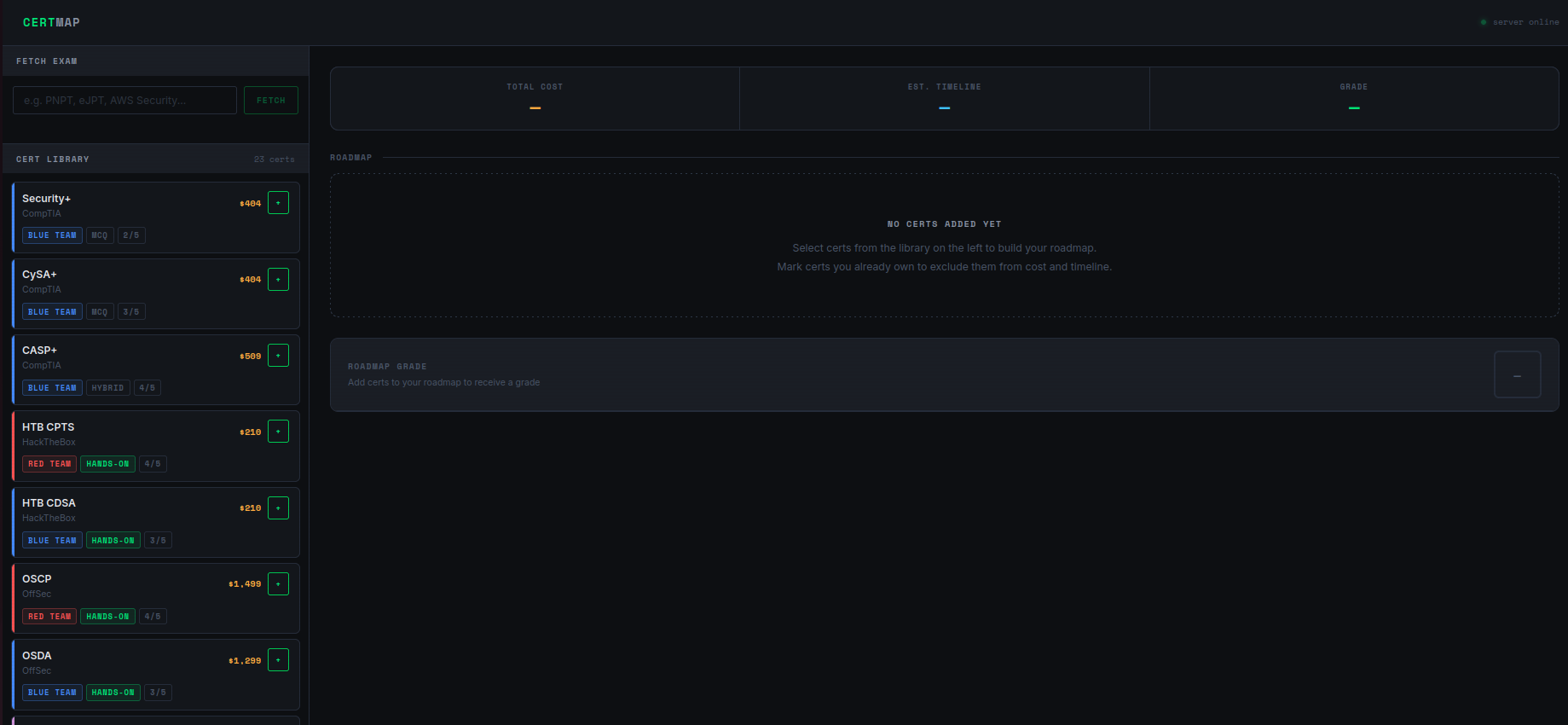
You can to add a certification to the roadmap. You can also mark the cert that you already have versus plan to get.
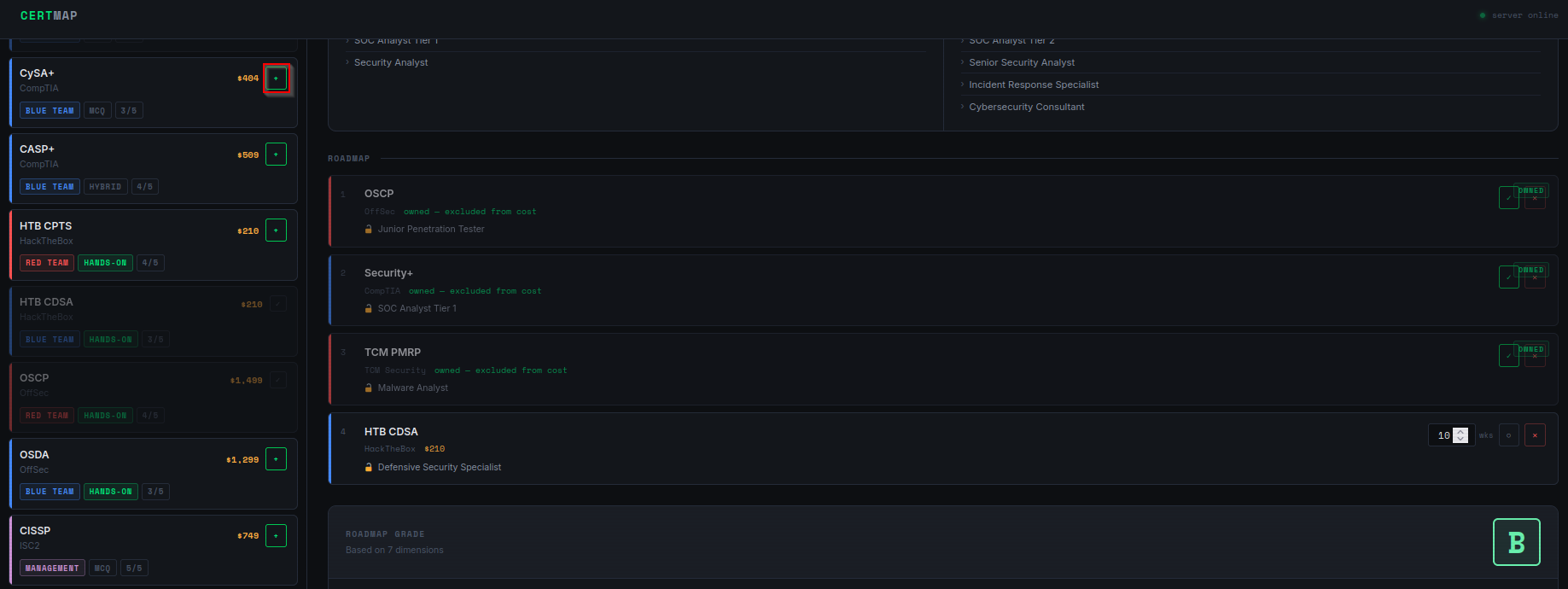
There is a fetch box that will allow you to enter an exam and add it to the library. Please note, that this presumes that it is in the Groq training data. Please check it to ensure its accuracy.
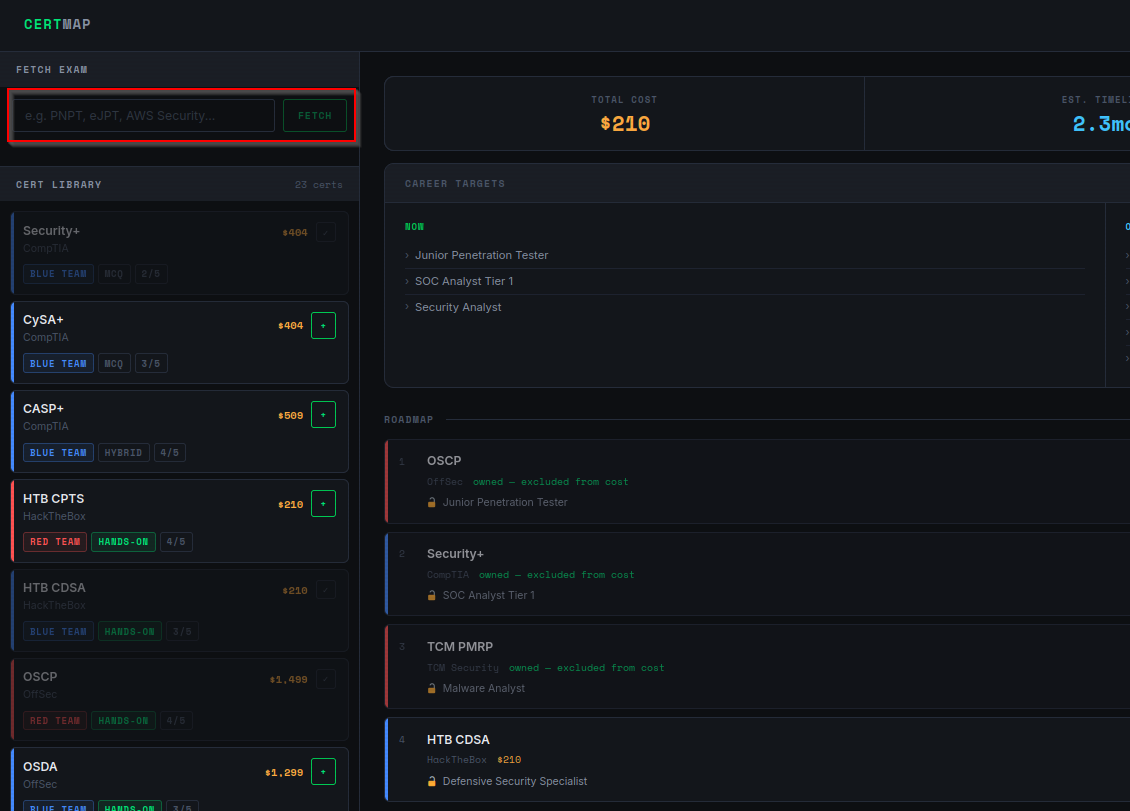
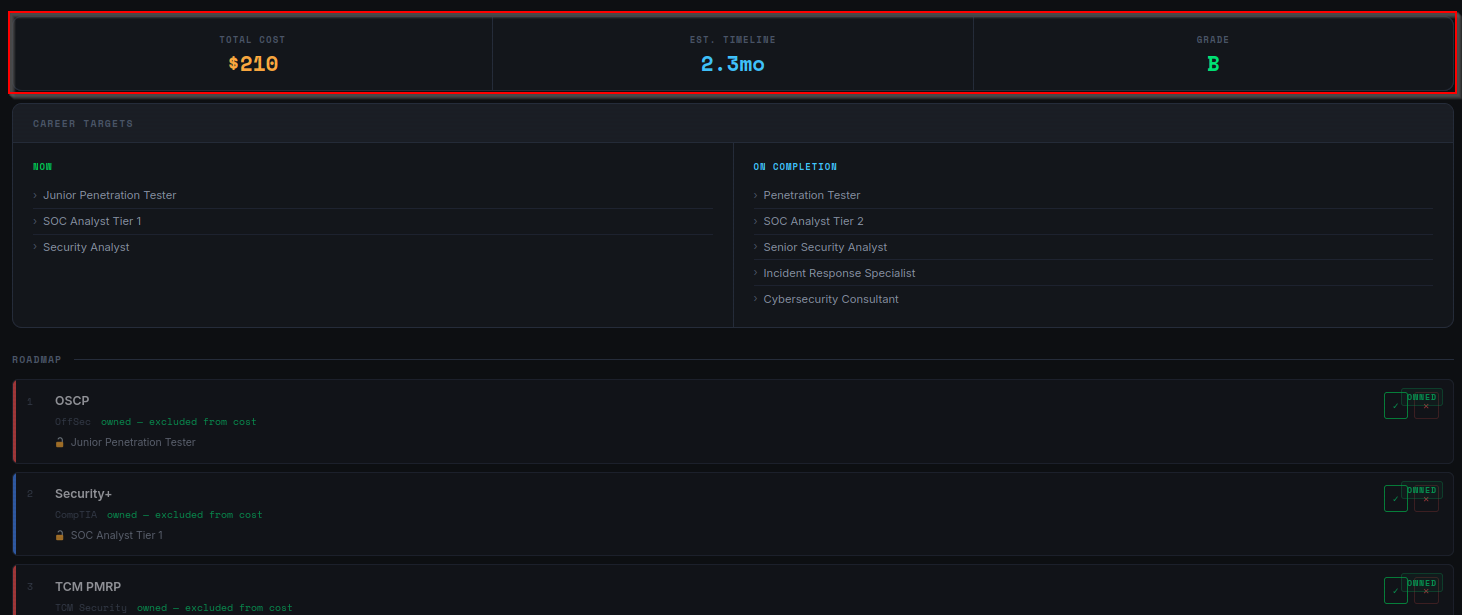
There is a top summary box where you can get the total cost of the outstanding certs and expected timeline to finish.
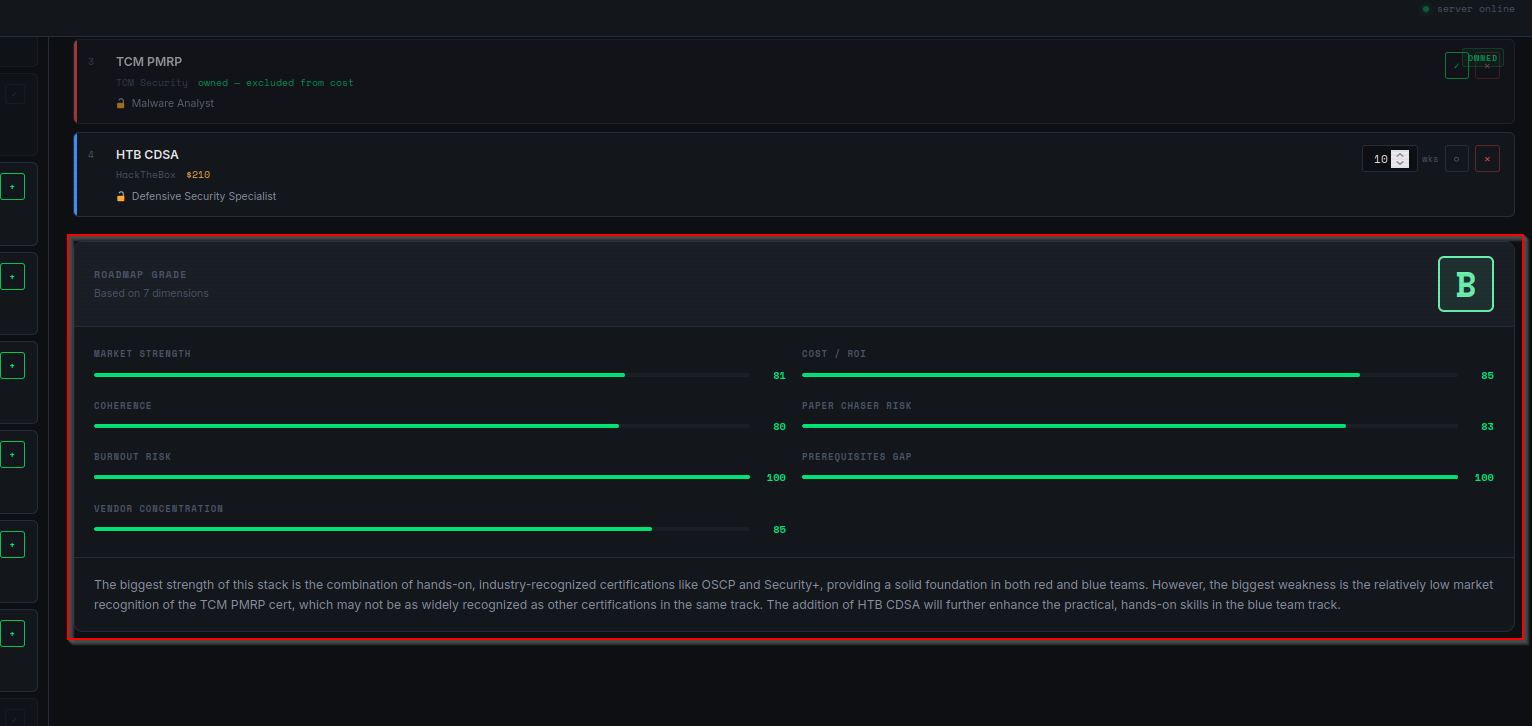
Below the roadmap, there is a full breakdown of the grade against all of the criteria that make up the grading.
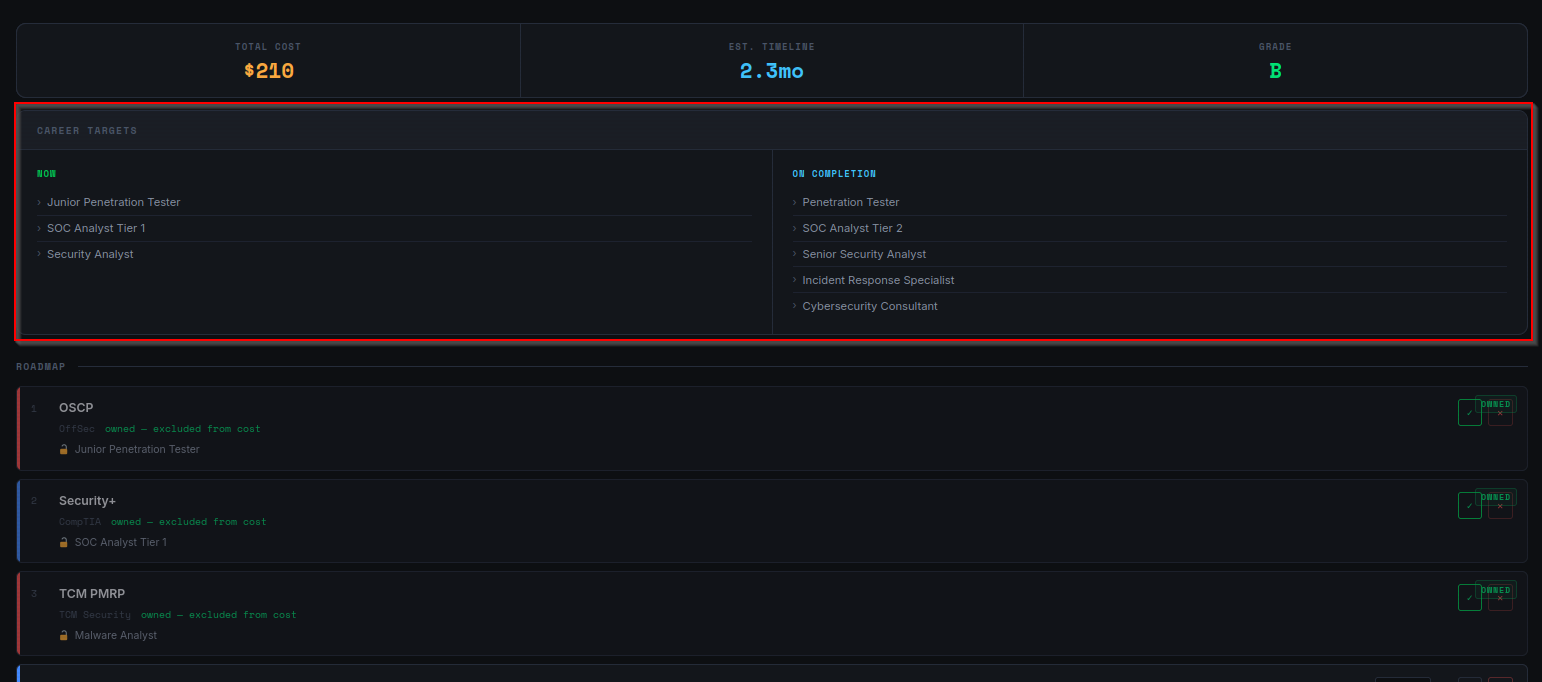
Finally, there is job title suggester so you can paste it directly into your favorite job search engine.
The Code
Backend
The first step is to load a JSON file that will serve as our seed certs to be able to hit MVP and have something to test.
<snip>

export const seedCerts = [
  {
    id: "comptia-sec-plus",
    name: "Security+",
    fullName: "CompTIA Security+",
    vendor: "CompTIA",
    track: "blue",
    price: 404,
    examType: "mcq",
    ecosystemLocked: false,
    studyWeeks: 8,
    market: 88,
    difficulty: 2,
    expires: true,
    renewYears: 3,
    roles: [
      "Security Analyst",
      "SOC Analyst Tier 1",
      "IT Security Specialist",
      "Systems Administrator"
    ],
    tags: ["blue", "entry-level", "mcq", "vendor-neutral", "baseline"],
    description: "Industry baseline certification. Widely required as a minimum bar by employers and government/DoD roles. MCQ only, no hands-on component."
  },

<snip>
Then, we have to normalize the cert data so we can send it to the LLM so it can read it and analyze. We should also craft the prompt message that clear explain to Groq what we are trying to do.
<snip>

  // Build a readable cert summary for the prompt
  const formatCert = (c) =>
    `- ${c.name} (${c.vendor}) | Track: ${c.track} | Price: $${c.price} | ` +
    `Type: ${c.examType} | Difficulty: ${c.difficulty}/5 | ` +
    `Market: ${c.market}/100 | EcosystemLocked: ${c.ecosystemLocked ?? false} | ` +
    `Tags: ${c.tags?.join(", ")}`

  const ownedSection = ownedCerts.length > 0
    ? `OWNED CERTS (already achieved — exclude from cost and timeline, include in coherence):\n${ownedCerts.map(formatCert).join("\n")}`
    : "OWNED CERTS: None"

  const plannedSection = plannedCerts.length > 0
    ? `PLANNED CERTS (not yet achieved — include in all scoring):\n${plannedCerts.map(formatCert).join("\n")}`
    : "PLANNED CERTS: None"

  const messages = [
    {
      role: "system",
      content: `You are a senior cybersecurity career advisor and certification strategist.
You will be given a certification roadmap split into OWNED certs and PLANNED certs.
Your job is to grade the overall roadmap and return structured JSON only.
Return ONLY a valid JSON object — no markdown, no code fences, no explanation.

CRITICAL RULES BEFORE SCORING:
- You will receive structured data fields for each cert. You MUST use those fields directly. Do not reason from general knowledge when a field provides the answer.
- examType field values are: "hands-on", "mcq", or "hybrid". Use these exactly.
- vendor field is the exact vendor name. Count distinct vendor field values to measure concentration.
- ecosystemLocked field is a boolean. Only certs with ecosystemLocked: true are locked ecosystems.
- owned field: true = person already holds this cert. false = planned, not yet achieved.
- All scores are 0-100 where HIGHER is BETTER (100 = best possible outcome for that dimension).

<snip>
Then, we are going use the express framework to set-up our middleware server and APIs.
<snip>

  /// ─── Middleware ───────────────────────────────────────────────────────────────

// In dev, Vite runs separately and proxies /api to us.
// In production, the built client is served from this same process.
// CORS is only needed in dev.
if (!IS_PRODUCTION) {
  app.use(cors({
    origin: "http://localhost:5173",
    methods: ["GET", "POST"],
  }))
}

app.use(express.json())

// ─── API Routes ───────────────────────────────────────────────────────────────

app.use("/api/fetch-exam", fetchExamRouter)
app.use("/api/grade-roadmap", gradeRoadmapRouter)

// ─── Health check ─────────────────────────────────────────────────────────────

app.get("/api/health", (req, res) => {
  res.json({
    status: "ok",
    model: process.env.NODE_ENV ?? "development",
    timestamp: new Date().toISOString(),
  })
})

<snip>
Start the middleware server to serve the APIs that were just created.
<snip>

app.listen(PORT, () => {
  console.log(`CertMap server running on port ${PORT}`)
  console.log(`Environment: ${IS_PRODUCTION ? "production" : "development"}`)
  if (!IS_PRODUCTION) {
    console.log(`Health check: http://localhost:${PORT}/api/health`)
  }
})

<snip>
Frontend
Add and remove certs since that is kind of necessary to grading cert.
<snip>

// ── Add cert to roadmap ───────────────────────────────────────────────────
  function handleAddCert(cert) {
    if (roadmap.find((c) => c.id === cert.id)) return

    const updated = [...roadmap, cert]
    setRoadmap(updated)

    const updatedWithOwned = updated.map((c) => ({
      ...c,
      owned: ownedIds.includes(c.id),
    }))
    triggerGrade(updatedWithOwned)
  }

  // ── Remove cert from roadmap ──────────────────────────────────────────────
  function handleRemoveCert(certId) {
    const updated = roadmap.filter((c) => c.id !== certId)
    setRoadmap(updated)

    const updatedWithOwned = updated.map((c) => ({
      ...c,
      owned: ownedIds.includes(c.id),
    }))
    triggerGrade(updatedWithOwned)
  }

<snip>
Then, we have to display the roadmap to the user in that center panel.
<snip>

{/* ── Right panel — roadmap + grades ── */}
        <main className="panel-right">

          {/* Summary bar */}
          <SummaryBar
            roadmap={roadmapWithOwned}
            timelines={timelines}
            gradeData={gradeData}
          />

          {/* Roadmap */}
          <div>
            <div className="section-heading">Roadmap</div>

            {roadmap.length === 0 ? (
              <div className="empty-state" style=>
                <div className="empty-state__title">No certs added yet</div>
                Select certs from the library on the left to build your roadmap.
                <br />
                Mark certs you already own to exclude them from cost and timeline.
              </div>
            ) : (
              <div className="flex-col gap-2" style=>
                {roadmapWithOwned.map((cert, index) => (
                  <RoadmapItem
                    key={cert.id}
                    cert={cert}
                    index={index}
                    timelineWeeks={timelines[cert.id] ?? cert.studyWeeks}
                    unlockTitle={gradeData?.certUnlocks?.[cert.id] ?? null}
                    onRemove={handleRemoveCert}
                    onTimelineChange={handleTimelineChange}
                    onOwnedToggle={handleOwnedToggle}
                  />
                ))}
              </div>
            )}
          </div>

<snip>
Create a score panel to display the grades and the ratings against all of our grading criteria.
<snip>

<div className="score-panel">

      {/* Header with grade badge */}
      <div className="score-panel__header">
        <div>
          <div className="label">Roadmap Grade</div>
          {isCalculating && (
            <div className="text-muted text-xs mt-1">
              Recalculating...
            </div>
          )}
          {!isCalculating && gradeData && (
            <div className="text-muted text-xs mt-1">
              Based on {gradeData.subscores ? Object.keys(gradeData.subscores).length : 0} dimensions
            </div>
          )}
        </div>
        <GradeBadge grade={gradeData?.grade ?? null} />
      </div>

      {/* Subscore bars */}
      <div className="score-panel__dims">
        {DIMENSIONS.map(({ key, label }) => (
          <ScoreDimension
            key={key}
            label={label}
            value={gradeData?.subscores?.[key] ?? 0}
          />
        ))}
      </div>

<snip>
Then, we need a file that will serve as the main method for the app.
// main.jsx
// React entry point. Mounts App into the DOM.

import React from "react"
import ReactDOM from "react-dom/client"
import App from "./App"
import "./styles.css"

ReactDOM.createRoot(document.getElementById("root")).render(
  <React.StrictMode>
    <App />
  </React.StrictMode>
)
And of course, web servers serve index.html as their default page.
<!DOCTYPE html>
<html lang="en">
  <head>
    <meta charset="UTF-8" />
    <meta name="viewport" content="width=device-width, initial-scale=1.0" />
    <meta name="description" content="Cyber certification roadmap planner and grader" />
    <title>CertMap</title>
  </head>
  <body>
    <div id="root"></div>
    <script type="module" src="/src/main.jsx"></script>
  </body>
</html>
And with that, we can test cert roadmaps until our hearts are content!