OSEDTutor
Created an App that Creates Lessons.

Introduction
So, you have decided that you wanted to play career campaign on hard mode. I support this decision. To see this through, you decided to register for the Offensive Security Exploit Developer (OSED) certification. It sits in the upper tier of offensive security certs and it definitely follows the OffSec tradition of punishing memorizers and forcing you to Try Harder. We are talking Windows exploit development, custom shellcode (goodbye, msfvenom), and bypassing defenses. It is not a “watched a YouTube video once” kind of certification. It is the kind where I truly learned what embrace the suck truly meant. Given this, I needed a game plan.
The Problem
Then, the realization hit you of what you actually signed up for. It begins with being introduced to new tools so you can learn a new programming language. However, the new language is more like a different culture with its registers and stack management. There are so many sources out there to sort through after you get through the class PDF. Corelan, FuzzySecurity, OST2, and GuidedHacking just to name a few that you can wade through. So, I decided that the world can get another one. One that can understand the context of learning and guide you specifically, create specific assignments, and grade said assignments to really accelerate your learning with personalization.
The Stack
- Storage
- SQLite - Server-side persistence
- Two LLM Models - Lesson generation and assignment review
- Backend
- Aiosqlite - Connection library for SQLite
- FastAPI - Framework for API infrastructure
- Frontend
- React - UI component library
- Vite - Development server and build tool
My Role
Similar to the last project, I architected the entire application, though this one was significantly more complicated. That meant determining the roles of the two different LLM models and mapping out what would need to get persisted to improve response quality. Claude AI generated the code based on the architecture I provided. I guided the generation through precise prompt engineering, requesting features one by one. This allowed me to review the code as a repository maintainer before commits to ensure cohesion of the product.
Current Status
MVP: Testing. Let’s call a spade a spade, I won’t call it done until I pass.
The Process
Walkthrough
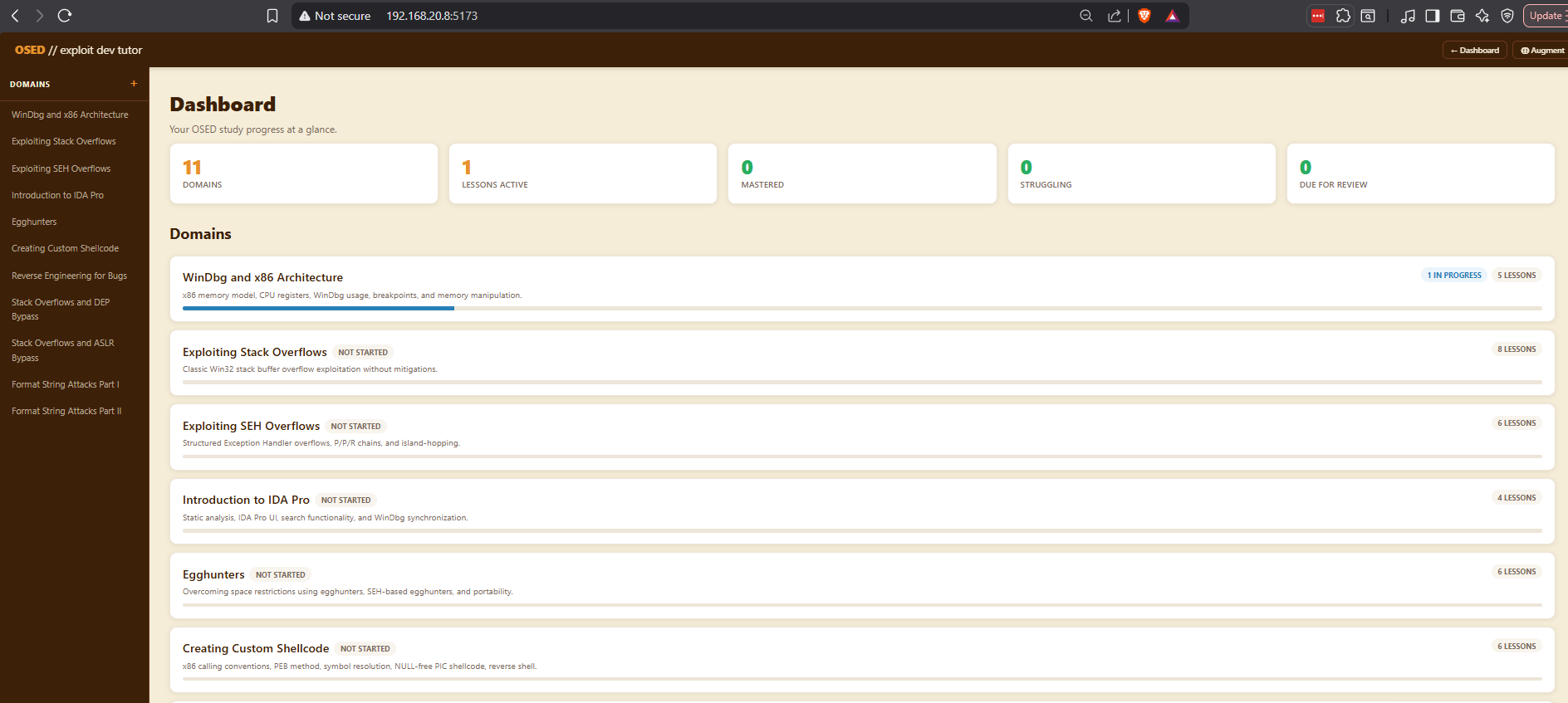
The Landing Page
The landing page is a where you can see the learning objective for the OSED, as well as, a summary, of your learning progress to date.
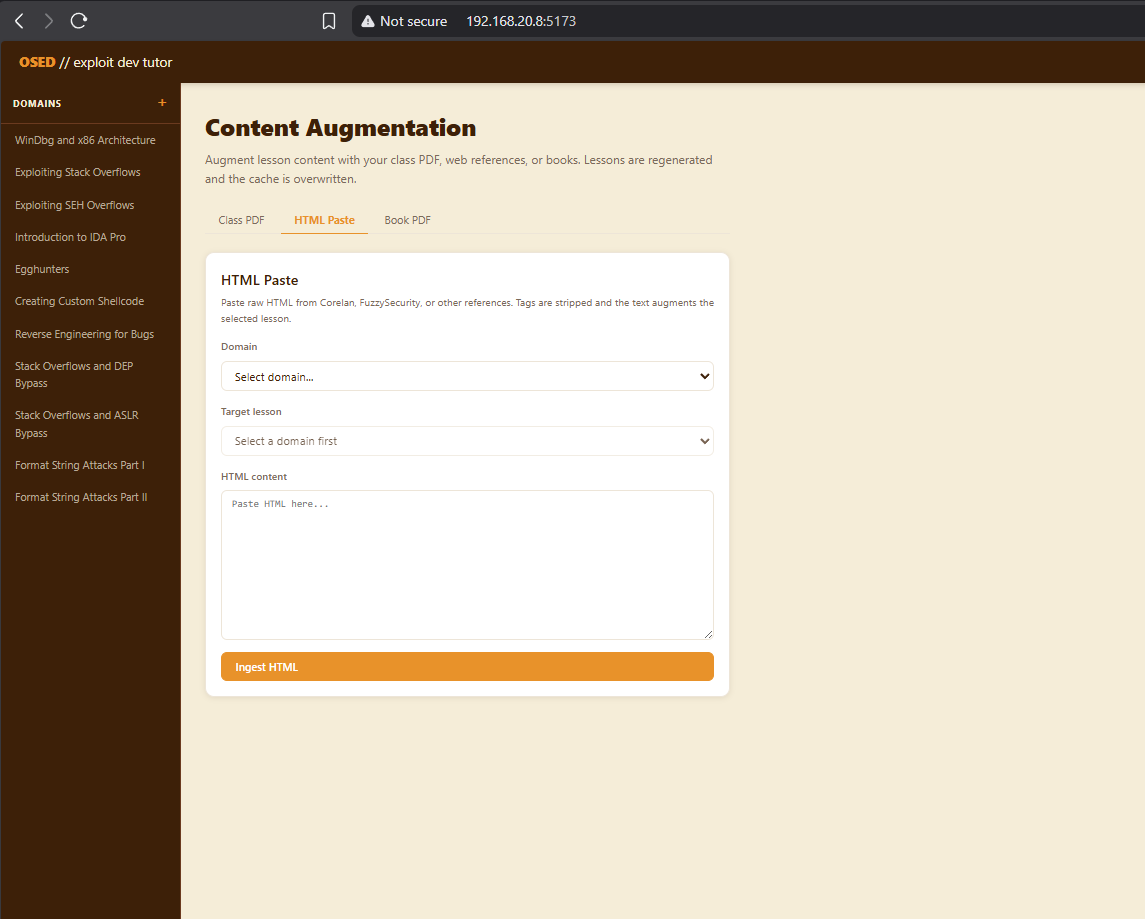
Augmentation
There is an opportunity to upload html and PDFs that will then get parsed. The parsing will get added to the lesson creation prompt to improve the quality of the lessons.
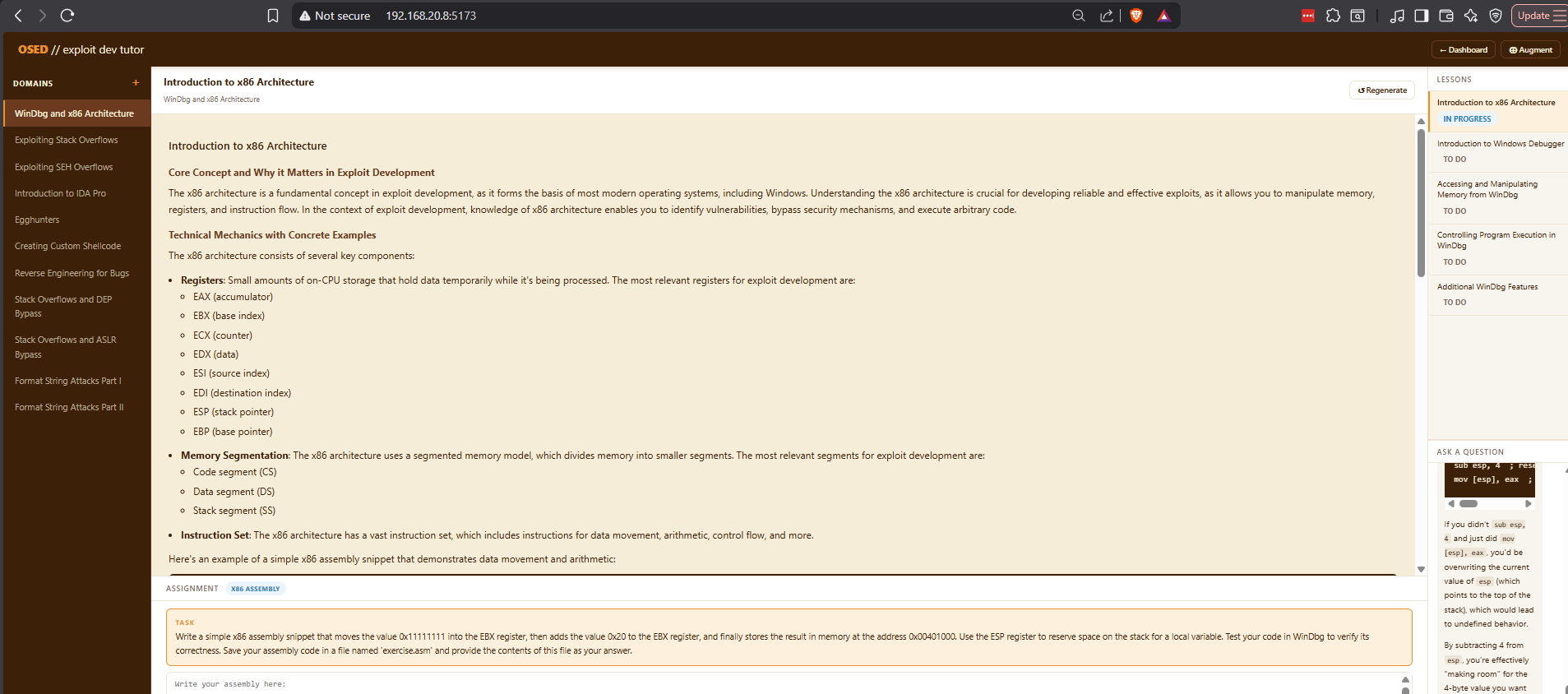
Lessons
You can click on a domain from the left-hand menu to enter the specific learning domain. From the upper right-hand lesson plan, you can select a specific lesson to load the lesson.
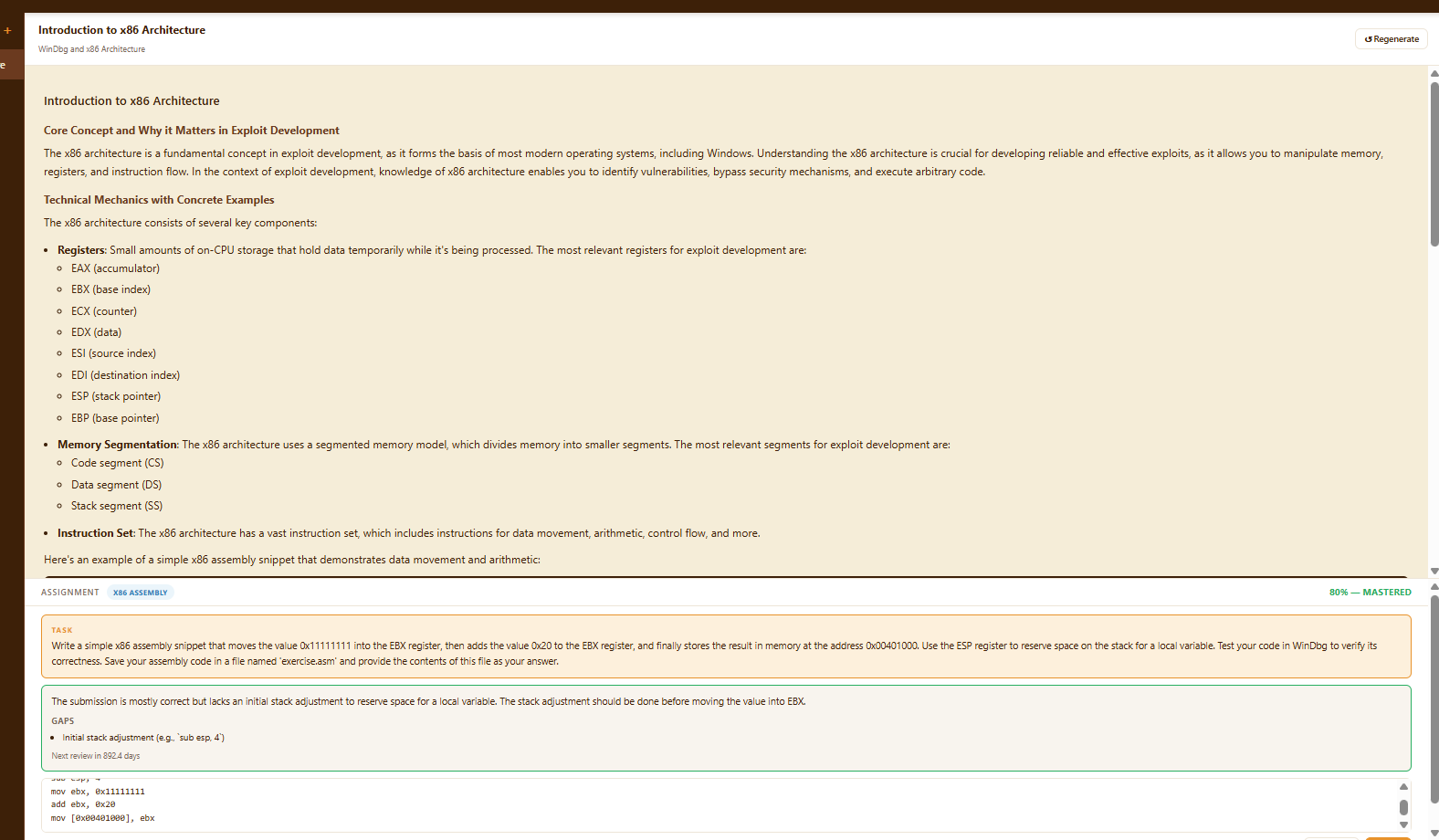
Assignments
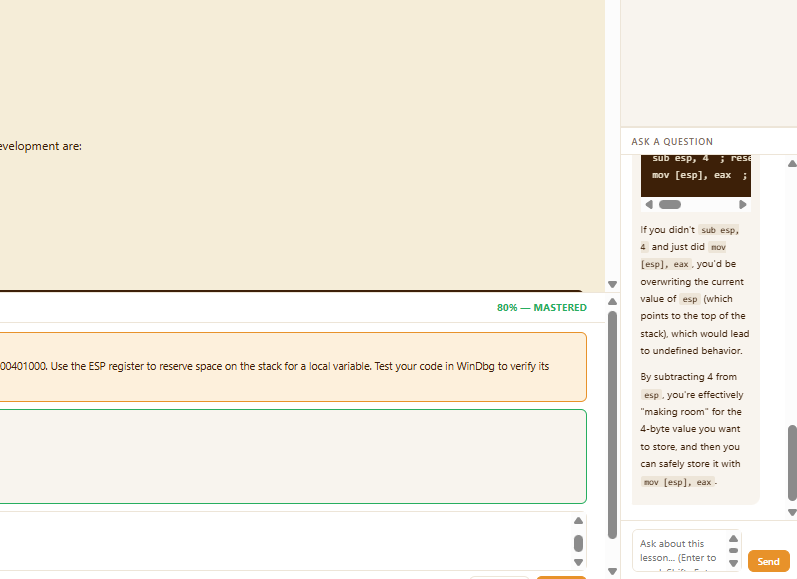
At the bottom, there is a section that generates an assignment for the student to complete. You can paste in the code and have it graded and receive feedback.
Chat Help
There is also a chat in the lower left-hand corner where you can ask any questions that you might have about the lesson or the assignment.
The Code
Backend
The first step is to generate a service to connect to the SQLit database the will serve as the persistence mechanism.
import aiosqlite
import os
from app.services.db.base import DatabaseService

DOMAINS = [
    {
        "name": "WinDbg and x86 Architecture",
        "description": "x86 memory model, CPU registers, WinDbg usage, breakpoints, and memory manipulation.",
        "sort_order": 1,
        "lessons": [
            ("Introduction to x86 Architecture", 1),
            ("Introduction to Windows Debugger", 2),
            ("Accessing and Manipulating Memory from WinDbg", 3),
            ("Controlling Program Execution in WinDbg", 4),
            ("Additional WinDbg Features", 5),
        ]
    },

<snip>

class SQLiteService(DatabaseService):

    def __init__(self):
        self.db_path = os.getenv("DATABASE_URL", "./osed_tutor.db")
        self._conn: aiosqlite.Connection | None = None

    async def connect(self) -> None:
        self._conn = await aiosqlite.connect(self.db_path)
        self._conn.row_factory = aiosqlite.Row
        await self._conn.execute("PRAGMA journal_mode=WAL")
        await self._conn.execute("PRAGMA foreign_keys=ON")
        await self._run_migrations()

    async def disconnect(self) -> None:
        if self._conn:
            await self._conn.close()

    async def execute(self, query: str, params: tuple = ()) -> aiosqlite.Cursor:
        cursor = await self._conn.execute(query, params)
        await self._conn.commit()
        return cursor

    async def fetchone(self, query: str, params: tuple = ()) -> dict | None:
        cursor = await self._conn.execute(query, params)
        row = await cursor.fetchone()
        return dict(row) if row else None

    async def fetchall(self, query: str, params: tuple = ()) -> list[dict]:
        cursor = await self._conn.execute(query, params)
        rows = await cursor.fetchall()
        return [dict(r) for r in rows]

<snip>
Pydantic library is used to created the models for the database objects.
from pydantic import BaseModel
from datetime import datetime


class ChatMessage(BaseModel):
    role:       str
    content:    str
    created_at: datetime | None = None


class ChatRequest(BaseModel):
    message: str


class ChatHistoryResponse(BaseModel):
    session_id: int
    messages:   list[ChatMessage]
The database functionality then gets rolled-up into the services layer. This allows for de-coupling to allow for switching the database out with massive refactors.
from fastapi import HTTPException
from app.services.db.base import DatabaseService
from app.services.llm.base import LLMService
from app.prompts.chat import build_chat_system_prompt
from app.models.chat import ChatHistoryResponse, ChatMessage
from typing import AsyncIterator


async def _get_or_create_session(lesson_id: int, db: DatabaseService) -> int:
    row = await db.fetchone(
        "SELECT id FROM chat_sessions WHERE lesson_id = ?", (lesson_id,)
    )
    if row:
        return row["id"]
    cursor = await db.execute(
        "INSERT INTO chat_sessions (lesson_id) VALUES (?)", (lesson_id,)
    )
    return cursor.lastrowid

<snip>
FastAPI is then used to create and serve the API endpoints so it can be consumed by the frontend.
from fastapi import APIRouter, Request
from fastapi.responses import StreamingResponse
from app.controllers.lesson_controller import (
    list_lessons, get_lesson,
    generate_lesson_content, save_lesson_content,
)
from app.models.lesson import LessonGenerateRequest
from app.services.llm.factory import get_llm_service

router = APIRouter()
llm = get_llm_service()


def db(request: Request):
    return request.app.state.db


@router.get("/domains/{domain_id}/lessons")
async def get_lessons(domain_id: int, request: Request):
    return await list_lessons(domain_id, db(request))

<snip>
And then the main file serves up the entire system.
from contextlib import asynccontextmanager
from fastapi import FastAPI
from fastapi.middleware.cors import CORSMiddleware
from dotenv import load_dotenv
import os

load_dotenv()

from app.services.db.factory import get_db_service
from app.api import health, domains, lessons, assignments, chat, ingest, dashboard

db = get_db_service()


@asynccontextmanager
async def lifespan(app: FastAPI):
    await db.connect()
    app.state.db = db
    yield
    await db.disconnect()


app = FastAPI(
    title="OSED Tutor API",
    version=os.getenv("APP_VERSION", "0.1.0"),
    lifespan=lifespan,
)

<snip>
Frontend
The frontend first consumes the APIs from the backend.
const API_BASE = import.meta.env.VITE_API_URL ?? 'http://localhost:8000'

export async function getChatHistory(lessonId) {
  const res = await fetch(`${API_BASE}/api/lessons/${lessonId}/chat`)
  if (!res.ok) throw new Error('Failed to fetch chat history')
  return res.json()
}

export async function sendChatMessage(lessonId, message) {
  const res = await fetch(`${API_BASE}/api/lessons/${lessonId}/chat`, {
    method:  'POST',
    headers: { 'Content-Type': 'application/json' },
    body:    JSON.stringify({ message }),
  })
  if (!res.ok) throw new Error('Failed to send message')
  return res.body.getReader()
}
There are also components that create the individual UI section that will get blended into the UI architecture.
import { useState, useEffect, useRef } from 'react'
import ReactMarkdown from 'react-markdown'
import { getChatHistory, sendChatMessage } from '../api/chat'

export default function ChatPanel({ lesson }) {
  const [messages,  setMessages]  = useState([])
  const [input,     setInput]     = useState('')
  const [streaming, setStreaming] = useState(false)
  const [error,     setError]     = useState(null)
  const bottomRef                 = useRef(null)
  const inputRef                  = useRef(null)

  // Load history when lesson changes
  useEffect(() => {
    if (!lesson?.id || !lesson?.content) return
    setMessages([])
    setInput('')
    setError(null)

    getChatHistory(lesson.id)
      .then(data => setMessages(data.messages ?? []))
      .catch(err => setError(err.message))
  }, [lesson?.id])

  <snip>
Then, there is an App.jsx which kind of instantiates the entire project.
import { useState, useEffect } from 'react'
import Navbar from './components/Navbar'
import Sidebar from './components/Sidebar'
import Dashboard from './components/Dashboard'
import LessonPanel from './components/LessonPanel'
import IngestPanel from './components/IngestPanel'
import { getDomains } from './api/domains'

export default function App() {
  const [domains, setDomains]           = useState([])
  const [activeDomain, setActiveDomain] = useState(null)
  const [activeLesson,  setActiveLesson]  = useState(null)
  const [view,          setView]          = useState('dashboard')
  const [loading, setLoading]           = useState(true)
  const [error, setError]               = useState(null)

  useEffect(() => {
    getDomains()
      .then(setDomains)
      .catch(err => setError(err.message))
      .finally(() => setLoading(false))
  }, [])

  function handleDomainCreated(domain) {
    setDomains(prev => [...prev, domain])
  }

  <snip>
The main.jsx is the equivalent of the main method in a compiled language.
import { StrictMode } from 'react'
import { createRoot } from 'react-dom/client'
import './index.css'
import App from './App.jsx'

createRoot(document.getElementById('root')).render(
  <StrictMode>
    <App />
  </StrictMode>,
)
And finally, the index.html which is standard in web projects.
<!doctype html>
<html lang="en">
  <head>
    <meta charset="UTF-8" />
    <link rel="icon" type="image/svg+xml" href="/favicon.svg" />
    <meta name="viewport" content="width=device-width, initial-scale=1.0" />
    <title>frontend</title>
  </head>
  <body>
    <div id="root"></div>
    <script type="module" src="/src/main.jsx"></script>
  </body>
</html>
And now, hopefully, we are ready for the OSED. Thanks OffSec for the excellent exam.